18.39 Automation with Hardware Output Sends
If using hardware output sends with any of your tracks you will find that you can automate the Volume, Pan and Mute parameters for these sends.
Kind: concept (user-guide-section) Chapter: 18 Automation – Envelopes and More Source: REAPER User Guide v7.70
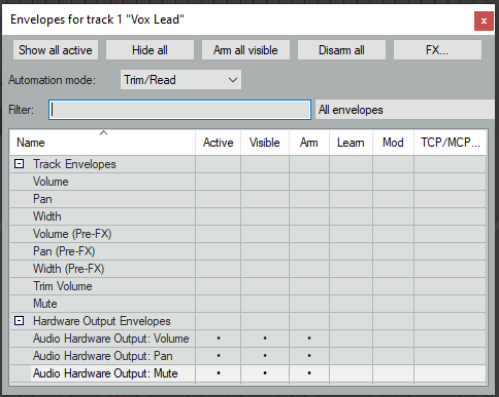
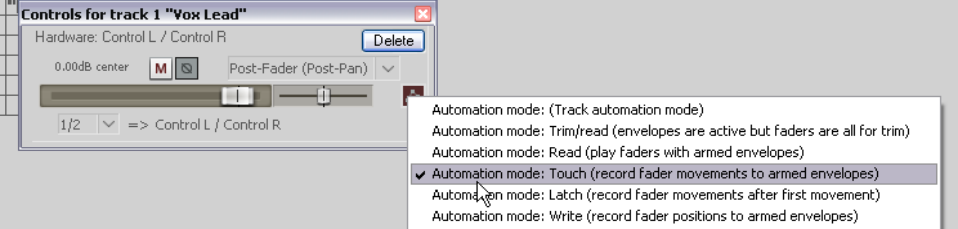
If using hardware output sends with any of your tracks you will find that you can automate the Volume, Pan and Mute parameters for these sends. These items will appear in the track’s envelopes window as shown on the right. In the example shown, we have a send from Track 1 to an Audio Hardware Output. We can now control the send volume with an envelope. We can even go one better. We can use fader movements to shape this envelope, but without using Write mode for any other envelopes that we may also have created. This can be done from within the track’s routing window. In the screen shot below automation mode has been set to Touch from within the routing window, just for that one envelope. You could now play your track, adjusting the audio hardware output send fader in the window shown below to adjust the send volume level and create your envelope. You can also do this with Track Send envelopes.
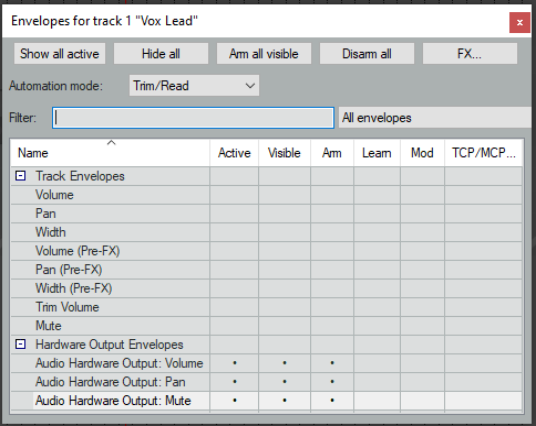
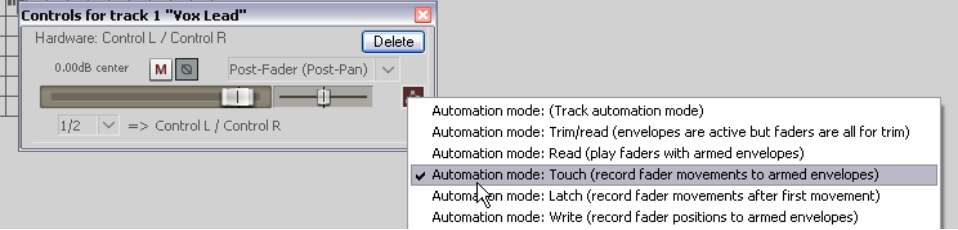
If using hardware output sends with any of your tracks you can automate the Volume, Pan and Mute parameters for these sends. These items will appear in the track’s envelopes window as shown on the right. In the example shown, we have a send from Track 1 to an Audio Hardware Output. We can now control the send volume with an envelope. We can even go one better. We can use fader movements to shape this envelope, but without using Write mode for any other envelopes that we may also have created. This can be done from within the track’s routing window. In the screen shot below automation mode has been set to Touch from within the routing window, just for that one envelope. You could now play your track, adjusting the audio hardware output send fader in the window shown below to adjust the send volume level and create your envelope. You can also do this with Track Send envelopes.