13.38 MIDI Preferences Settings
To specify MIDI preferences, choose the Options, Preferences command (Ctrl P) and then select the Media, MIDI page.
Kind: concept (user-guide-section) Chapter: 13 Working with MIDI Items Source: REAPER User Guide v7.70
To specify MIDI preferences, choose the Options, Preferences command (Ctrl P) and then select the Media, MIDI page. You'll find these shown in detail in Chapter 22, but for now note that you can:
- Specify whether by default new MIDI
items are created as REAPER media items (the default) or .MID files.
- Specify how your edits to imported .MID files are to be interpreted – that is, whether to apply your edits
only to the item in the REAPER project file or also to the original file on your disk.
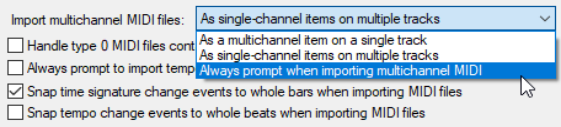
- Set the default behavior for imported multichannel MIDI files – as multichannel on a single track, as single-
channel items on multiple tracks, or always prompt to ask. Using in project MIDI items (rather than separate .MID files) for your MIDI items bestows some important advantages. For example, you can use your undo history to readily undo MIDI editing actions. You can also save different versions of the same project with different MIDI arrangements. Overdub/replace recording will not work correctly with .MID files.