18.29 Automation of Container FX Parameters
In Chapter 17 we introduced and explained the use of FX containers.
Kind: concept (user-guide-section) Chapter: 18 Automation – Envelopes and More Source: REAPER User Guide v7.70
In Chapter 17 we introduced and explained the use of FX containers. By default, these FX parameters are not listed in the track’s envelope window. To create an envelope for any such parameter do this:
Click your mouse first on the control (such as a fader) that you wish to automate, then on the FX Param button.
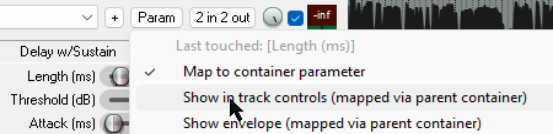
From the Param menu choose Map to container parameter. If you wish, also choose Show in track controls.
An envelope for this parameter will now be available in the track ‘s envelope window, from where it can be managed (made active, visible, armed, etc), just like your other FX parameters.