6.15 Plug-in Delay Compensation
By default, REAPER uses plug-in delay compensation (PDC) to ensure that the audio from your tracks remains time aligned.
Kind: concept (user-guide-section) Chapter: 6 Managing Track and Item FX Source: REAPER User Guide v7.70
By default, REAPER uses plug-in delay compensation (PDC) to ensure that the audio from your tracks remains time aligned. This, for example, is likely to be needed when one or more FX chains includes a plug-in such as reverb. In most circumstances it would be unwise to alter REAPER’s default PDC settings. Nevertheless the FX chain FX menu allows you to manage Chain PDC mode for an item or track by setting it to Per chain compensation, Per FX compensation or to Ignore plug-in delay. For the master track, there is also an option to select Hardware output compensation. An option is also available from the x in/ x out button context menu of individual plug-ins. Adjustments can compensate for any latency caused by a plug-in. The latency for any track is displayed in
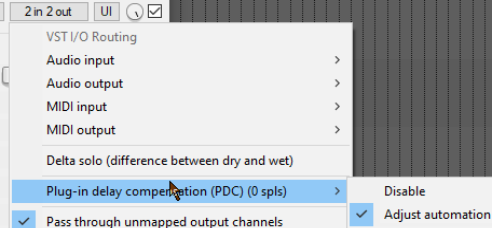
the bottom left corner of its FX chain window. The track media is read in advance, so as to be heard at the correct time, but input monitoring is delayed. If you find that PDC is creating problems (for examples, dropouts or excessive latency) then it can be disabled for any plug-in from the pin connector button (shown above labelled “2 in 2 out”) context menu. Note too that PDC is disabled when feedback routing is employed.