20.7 Understanding Video Formats
Newcomers to video often find the whole topic bewildering.
Kind: concept (user-guide-section) Chapter: 20 Using REAPER with Video Source: REAPER User Guide v7.70
Newcomers to video often find the whole topic bewildering. This section aims to guide you thru some basic concepts, so that you can at least confidently get started. It is not comprehensive and by no means covers everything that you should eventually need to know. Video files hold video and other data that exhibits a number of attributes such as frame rate, pixel dimensions and audio channels. Different formats can be used for capturing, saving, editing and distribution of this data. Different formats are characterised by the whichever video container and codec they use.
Video signal attributes
As with most things audio and video, the higher the numbers the better the quality and the larger the resulting file size! In particular, video characteristics include:
●Frame size: the video frame's dimensions, measured in pixels, typically within the range 160 (width) by 120 (height) to 1920 by 1080 (Full HD). ●Frame rate: the speed with which each frame is first captured then played back. Each frame holds a still image. The human eye starts to see motion (albeit “jerky”) at 8 frames per second (fps). The motion will start to appear smooth at rates of 24 fps and above. The U.S. standard frame rate for 720 HD (1280 by 720 pixels) is 59.94 fps, often rounded up to 60 fps ●Aspect ratio:the ratio of width to height. This can be expressed either as whole numbers, e.g. 16 by 9, or as a decimal ratio, e.g. 1.78:1. 16 by 9 is the ratio used by widescreen TV. ●Bit rate: the data transfer rate, i.e. from the file to the screen. Bit rate is usually measured in megabits per second (mps). By way of example, HD Blu-ray video typically uses a bit rate of 20 mbps, standard DVD quality is around 6 mbps. HD mobile phone, on the other hand uses rates of 2500 (HD) or 5000 (Full HD) kilobits per second (kbps). ●Audio sample rate: the number of samples per second used to digitize recorded sound. This is discussed in Chapter 2 and Chapter 3.
Container files
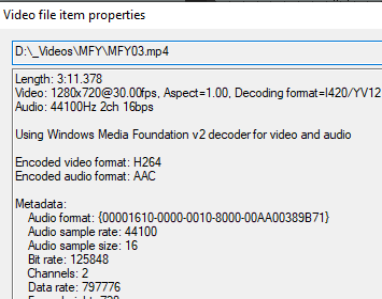
Container files are files that contain video (and other related) data. You are probably at least vaguely familiar with commonly used container extensions such as .MOV, and AVI. Different containers provide different degrees of support for (for examples) different video and audio compression formats, subtitles, and so on. For example, several container formats support multiple audio streams, others support only one. In fact, you can learn very little about a video file from its container type alone. To do that, right-click over the video item within REAPER and choose Video Item Properties... from the context menu. An example is shown above. When rendering video in REAPER (see Chapter 21) available formats are AVI, QT/MOV/MP4, MKV and WEBM.
Codecs
If the container format provides a container for holding a file's data, then the codec (coder/decoder) is the method by which that data is actually encoded. The very large number of codecs available makes this whole topic something of a minefield. Important characteristics of codecs include their video quality, performance factors (such as compression/decompression speed, supported profiles, options, supported resolution, and so on). Some codecs are available free of charge, others you have to pay for. Because raw video files are so large, file size compression is one of the most important aspect of video codecs. Indeed, most consumer standard recording equipment captures video in the first place in compressed rather than raw video format. When rendering in REAPER, your choice of codec will largely depend on which container format is selected. Note: For more technical information, see: https://forum.cockos.com/showthread.php?t=82459