13.39 Exporting Project MIDI
From Arrange view, the File, Export Project MIDI … command can be used to export either an entire MIDI project or selected items or tracks, or a time selection within that project (all or selected items) to a single MIDI….
Kind: concept (user-guide-section) Chapter: 13 Working with MIDI Items Source: REAPER User Guide v7.70
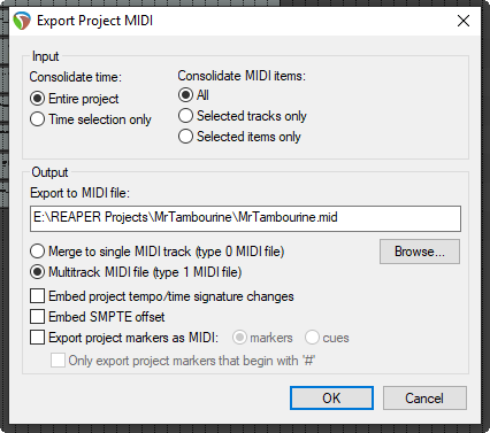
From Arrange view, the File, Export Project MIDI … command can be used to export either an entire MIDI project or selected items or tracks, or a time selection within that project (all or selected items) to a single MIDI file. If no time selection is made, data will be exported for the entire timeline.
An example of such a project file is shown here. It includes six tracks with MIDI events ( a different channel for each track), enclosed in a folder whose FX chain includes a virtual instrument. For the most part, the options shown here require little explanation. You can choose to export the Entire project time or the current Time selection only. You can include All media items, or Selected tracks only or Selected items only. In the example shown, All MIDI items has been chosen. You can merge MIDI tracks to a single MIDI track as a type 0 file or export it as a Multitrack MIDI file, with the integrity of the different tracks maintained in the type 1 file. You also have options to Embed project tempo/time signature changes and/or Embed SMPTE offset and/or Export project markers as MIDI markers or cues. This includes an option to Only export project markers that begin with #.