9.19 Dynamic Splitting
Dynamic splitting is a very powerful feature which has a number of applications.
Kind: concept (user-guide-section) Chapter: 9 Tempo Based Production, Loops, Markers and Regions Source: REAPER User Guide v7.70
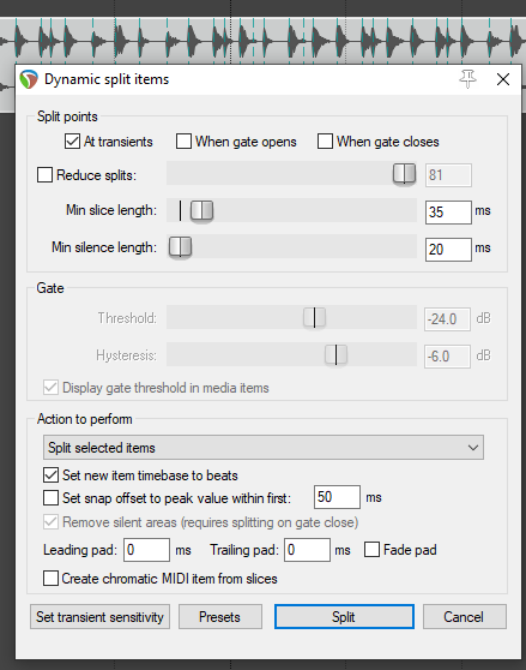
Dynamic splitting is a very powerful feature which has a number of applications. You have already seen (in Chapter 7) how it can be used to remove silence. For example you might have recorded a pretty good bass line that you'd like to use for a song. Maybe it was recorded at 96 beats per minute. The timing might be a bit out at times but on the whole you're pretty pleased with it. The trouble is that you want to use 120 beats per minute for your new song. Here's another example. Maybe you've recorded a killer slide guitar track. You like it but think it would be pretty clever to give the tune one or two tempo changes. Dynamic splitting is the answer to both these challenges. It works on the principle that you can instruct REAPER to split any media item (or selection of media items) according to criteria that you specify. Basically it works like this:
- You first select the media item (or items) to be split.
- You right click over the item and choose
Item processing, Dynamic split
items… from the menu.
- This causes the Dynamic split items dialog box to be opened.
- You give it the information that it needs
to work out where to split your items. This will essentially either be to split the track at its transients or to use a noise gate to split whenever the audio volume falls below a specified amount. As you will shortly see, each has its separate uses.
- REAPER then "shadow splits" your selected item(s). That is to say, it indicates with a row of colored bars
exactly all of the points at which the item will be split if the parameter settings are left as they are.
- You make such adjustments as you wish to the parameter settings until satisfied that they are right.
- You tell REAPER to split the items.
- Once split, each slice of the original item will be set to the current timebase. You can set any of the splits
to any other timebase you choose. You can use the items together or individually, according to your needs. Suddenly you've got a whole library of samples!
Dynamic splitting is non-destructive. This means that your original audio files (WAV, MP3, AIF or whatever) remain intact. Nevertheless, if you are going to use this method to build a sample library, it's often a good idea to work on a copy of the original track. This just makes it easier to go back to the original if you wish to use it to make a fresh set of samples. Let's now take a look at an example or two.