18.11 Envelope Panel and Track Menu Controls
The envelope panel's fader is used to write automation (write, latch or touch modes), show automation changes (read mode) or adjust the parameter value for the entire track or selected envelope segment (trim/read mode).
Kind: concept (user-guide-section) Chapter: 18 Automation – Envelopes and More Source: REAPER User Guide v7.70
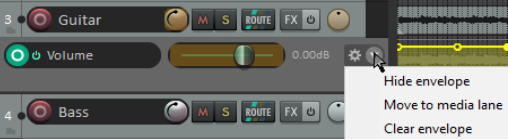
The envelope panel's fader is used to write automation (write, latch or touch modes), show automation changes (read mode) or adjust the parameter value for the entire track or selected envelope segment (trim/read mode). When a track has other envelopes that are not displayed in lanes, you can click on the envelope name (shown above is Volume) and choose from the list a different envelope to display in its place. The Track menu includes an Envelopes command which includes toggle options for managing all volume and pan. For each of these, you can turn on or off their visibility and/or their active state. Other controls are the Bypass toggle and next to that the Hide/Clear button (used to hide an envelope, move it to the media lane, or clear it altogether). FX parameter envelopes may also have some additional controls, for example to enable parameter modulation or learn mode (see later in this chapter and Chapter 19). You can right-click on the envelope panel to display a context menu of envelope options, including to change the envelope displayed in that lane, remove the envelope altogether, or change track automation mode.