15.12 Keyboard Shortcuts for FX and FX Chains
To create keyboard shortcuts for any of your favorite FX (or FX chains), display the FX browser (View, FX Browser), then right-click over the FX or chain name and choose Create shortcut… from the context menu.
Kind: concept (user-guide-section) Chapter: 15 Customization: Actions, Mouse Modifiers, Menus and More Source: REAPER User Guide v7.70
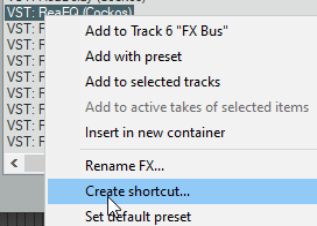
To create keyboard shortcuts for any of your favorite FX (or FX chains), display the FX browser (View, FX Browser), then right-click over the FX or chain name and choose Create shortcut… from the context menu. You can then define the shortcut in the usual way. Once assigned, the shortcut can be used to insert the FX into any track or item, or any selection of tracks or items. These shortcuts can also be added to REAPER’s menus and/or toolbars, as explained later in this chapter.