19.4 Defining a Parameter for Modification
To select an FX parameter to be modified, follow either of these sequences.
Kind: concept (user-guide-section) Chapter: 19 Parameter Modulation Source: REAPER User Guide v7.70
To select an FX parameter to be modified, follow either of these sequences:
- Open the track or item plug-in’s FX window.
-
With the mouse, click on the control for the parameter that you wish to modulate.
-
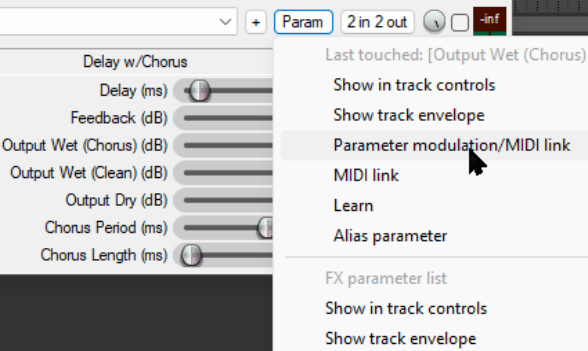
Click on the Param button in the plug-in window, then choose
Parameter modulation/MIDI
link from the menu that is then displayed (as shown here).
Or:
- Display the track’s
Envelopes/Automation
window (Trim button) and click on the + for any plug-in to display the list of its controls.
-
Click in the Mod column for any parameter that you wish to have modified by an audio signal. You will then see a small check box next to the Mod text for that item in the Envelopes window .
-
Close the Envelopes/Automation window.
Notice (right) that the name of the last touched parameter – the one to which parameter modulation will be applied – is shown dimmed at the top of the Param button menu.