6.24 Audio Signal Flow Chart: Tracks and Folders
This diagram illustrates specifically the audio flow for tracks and folders.
Kind: concept (user-guide-section) Chapter: 6 Managing Track and Item FX Source: REAPER User Guide v7.70
This diagram illustrates specifically the audio flow for tracks and folders.
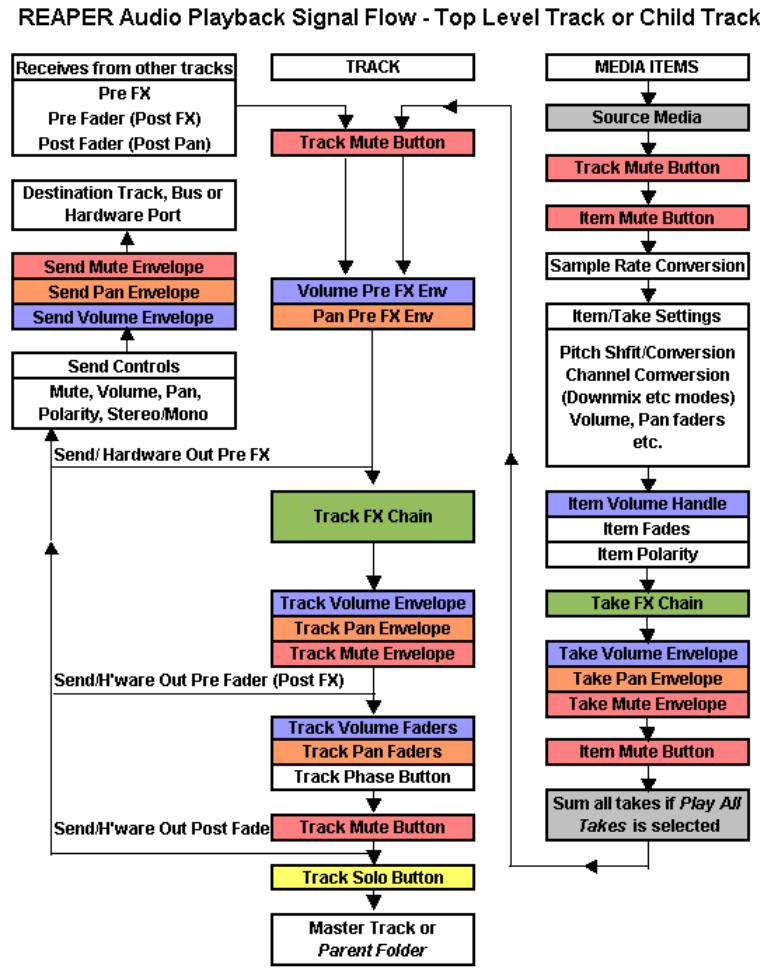
Notes:
- The Trim Volume envelope (not shown) comes after the Track Volume envelope and before the Send/Hardware Out Pre Fader (Post FX). 2. The track mute button is shown more than once (near the beginning and near the end of the chain). This is because it does not only mute at the beginning (so that for example, all media items are effectively muted), it also mutes at the end (so that, for example, a synth in the track FX chain that is fed MIDI data via a receive from another track is also muted). 3. If track mute and track solo buttons are both enabled, then solo overrides the mute. 4. If the Master is soloed, direct outputs to hardware from tracks/folders will not be processed.