5.17 Track Group Management from the Track Panel
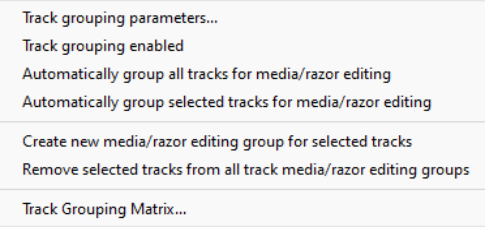
The Track Grouping command on the track panel context menu provides several options for managing track grouping, First select the panels of the tracks that you wish to group, then display this menu and choose Track grouping enable/ With the….
Kind: concept (user-guide-section) Chapter: 5 Project Arrangement Basics Source: REAPER User Guide v7.70
The Track Grouping command on the track panel context menu provides several options for managing track grouping, First select the panels of the tracks that you wish to group, then display this menu and choose Track grouping enable/ With the track panels still selected use Track grouping parameters… to open the grouping parameters box. Here, for example, you can link volume (lead/follow) and/or pan (lead/follow). An important feature in this menu is the ability to
Create new media/razor editing group for
selected tracks and to subsequently Remove selected tracks from all track media/razor editing groups. There are also options to Automatically group all/selected tracks for media/razor editing. Razor editing and its many benefits are explained in detail in Chapter 7.