3.1 Creating a New Project
This chapter will take you thru what you need to know to get started with recording in REAPER.
Kind: concept (user-guide-section) Chapter: 3 Recording Audio and MIDI Source: REAPER User Guide v7.70
This chapter will take you thru what you need to know to get started with recording in REAPER. At the end of the chapter, you will find a helpful checklist.
To create a new project file, you can either use the File, New Project command, or press Ctrl N.
The Project page within the Options, Preferences dialog box can be used to determine how REAPER behaves each time you create a new project:
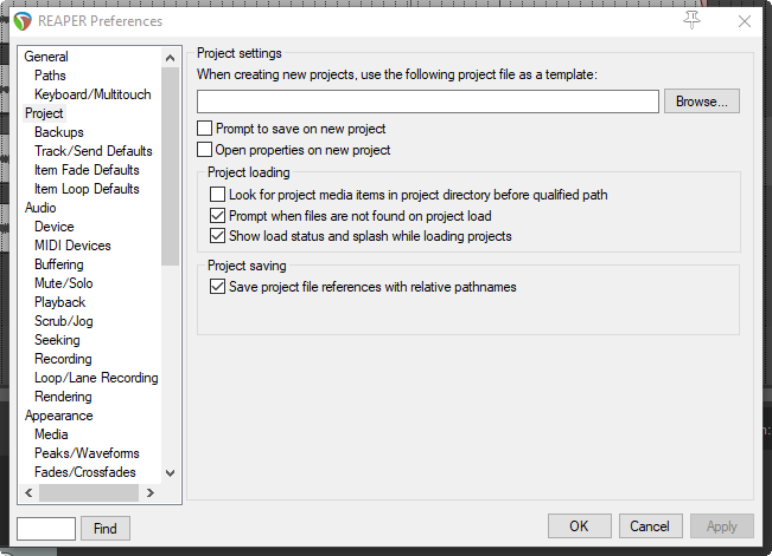
Amongst the most useful options on this screen are the following:
-
Use project file as a template. This enables you to use an existing project file as a template for new projects. All tracks, FX, tracks, buses, routing etc. will be copied into the new file from the template file.
-
Prompt to save on new project. If you enable this option, you will be prompted to save your new projects immediately they are created.
-
Open properties on new project. If this option is selected, the Project Options dialog box will automatically be displayed every time you create a new project. This can help ensure that you select the correct recording format and other settings that you require. In addition, the Options, Preferences, Project, Backups (See Section 22.3.1) page offers you various options for backing up your projects, such as:
-
Whether to preserve previously saved versions of the project. This helps protect you against accidental loss of work. There are several options for managing this
-
Whether to automatically save to a timestamped file at intervals you specify. Again, there are several options for how you would like to implement this. T This can help to protect you from the consequences of an unforeseen circumstance such as a power outage or a computer crash. You can save these files to the project directory and/or an additional directory. You can also specify the frequency (in minutes) of automatic saving, and whether to apply this when not recording, when stopped, or at any time.