15.6 Global Shortcut Overrides
The Keyboard/MIDI/OSC Input window is opened by selecting an action and clicking the Add button.
Kind: concept (user-guide-section) Chapter: 15 Customization: Actions, Mouse Modifiers, Menus and More Source: REAPER User Guide v7.70
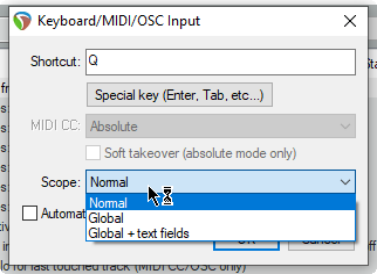
The Keyboard/MIDI/OSC Input window is opened by selecting an action and clicking the Add button. This window includes a scope option, which allows you to define a keyboard shortcut as global. Defining a shortcut as global allows you to use that shortcut in all action list sections. For example, in our Solo in front example, making it global would allow you to toggle this feature on and off when you were adjusting an FX parameters within an FX window, or when you were working in the MIDI editor.
Choosing global + text allows the shortcut to be used even when you are editing a text field. Global overrides are shown in the action list with (g) beside them - in this example, this would be (g)Q instead of just Q.