13.41 ReaControlMIDI
ReaControlMIDI can be used to set a track's various MIDI parameters, including volume and pan.
Kind: concept (user-guide-section) Chapter: 13 Working with MIDI Items Source: REAPER User Guide v7.70
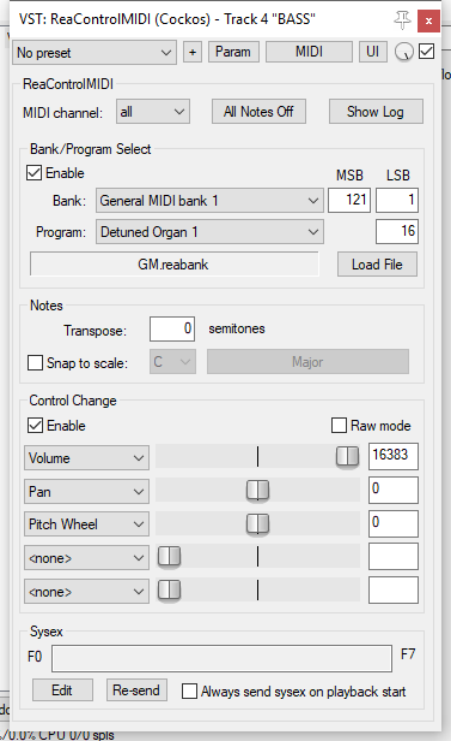
ReaControlMIDI can be used to set a track's various MIDI parameters, including volume and pan. It can be inserted from the track’s FX chain, or by right-clicking over the track name or number and choosing MIDI track control then Show MIDI track control panel from the menu. You can use different instances of this plug-per track to send different MIDI messages to different channels (for example, to send control messages to a synth or virtual instrument placed after ReaControlMIDI in the FX chain). Many DAWs have MIDI tracks with MIDI-specific controls, like bank/program select, MIDI volume and pan, etc. REAPER instead uses ReaControlMIDI, which provides a MIDI track TCP for any track. You can insert multiple instances of ReaControlMIDI, or insert it at any point in an FX chain, either for the track as a whole or for individual items. Notable features of ReaControlMIDI include: Load File: You can load a REAPER .reabank file or Cakewalk .ins file of instrument definitions and then select a preferred bank/program combination. Control Change: Up to five CC items can be selected from the drop down lists. Any and all of the items available for CC lanes in the MIDI Editor are available. Show Log reveals a log of MIDI activities. You can choose to include any or all of control change, sysex, all-notes-off and/or meta-message activities. With ReaControlMIDI you can also create MIDI CC track envelopes to automate of any of the plug-in's enabled CC sliders. Automation will be explained in Chapters 18 and 19. You can also assign track controls to the TCP and/or MCP to manage its various parameters. This is explained in Chapter 11.