1.21 Localization and Language Packs
You can select a language pack for REAPER to use for its menus, dialog boxes, tool tips, and so on.
Kind: concept (user-guide-section) Chapter: 1 Setting Up and Getting Started Source: REAPER User Guide v7.70
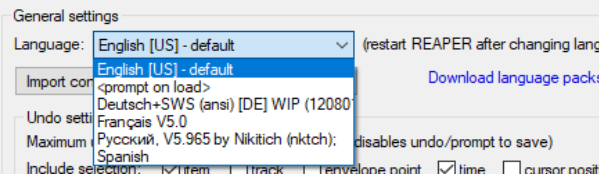
You can select a language pack for REAPER to use for its menus, dialog boxes, tool tips, and so on. The default language is U.S. English. Language packs are managed from the General page of REAPER's Preferences. To see what language packs are available, and to download any, click on the link Download language packs (see below). This will take you to a URL where you can follow the links (including to REAPER Stash) to find your language. After downloading, close the Preferences window and use the command Options, Show REAPER resource path in Explorer/Finder to display REAPER's resource folders. Next, drag and drop the downloaded file(s) into the LangPack folder. To select a language pack other than U.S. English, select from the drop down list (right) and click on OK. You will need to restart REAPER for the language to take effect.