18.25 Automation with Trim Volume Envelopes
Note: The illustrations in this section use the REAPER 5 default theme.
Kind: concept (user-guide-section) Chapter: 18 Automation – Envelopes and More Source: REAPER User Guide v7.70
Note: The illustrations in this section use the REAPER 5 default theme. The method and instructions are the same regardless of which theme you are using.
The Trim Volume is a special kind of envelope that can be used to fine tune or “tweak” a track's volume envelope. This might be the case, for example, if you wish to experiment with different volume levels before committing them to the volume envelope. Some points to note about trim envelopes are:
- It does not correspond to any track control and cannot be armed or written in write, touch or latch mode.
- While it is possible to use a trim envelope on its own, i.e. without also having a volume envelope, this
practice is not generally recommended. Here is an illustration of how Trim Volume might be used:
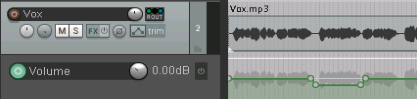
Example
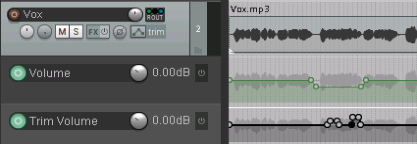
In this first illustration, (above right) a volume envelope has been added to lower the vox during part of the song. On playback, however, we might find that the occasional phrase or word might be slightly buried in the mix. A trim envelope is added to further adjust the volume of this track (as shown). You can take this one step further and lock the trim changes on to the volume envelope. REAPER includes the following two actions:
Track: Apply trim envelope to volume envelope,
clear trim envelope, and
Track: Apply volume envelope to trim envelope,
clear volume envelope.
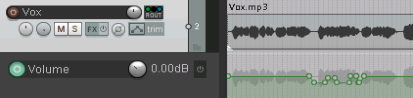
In the above example, you could run the first of these actions to produce the result shown. The trim envelope could then either be removed altogether, or used to again make further changes to the volume envelope.