3.2 Setting Media Project Options
You can display the file’s Project Settings window – Alt Enter – to ensure you are using your preferred Media Settings.
Kind: concept (user-guide-section) Chapter: 3 Recording Audio and MIDI Source: REAPER User Guide v7.70
You can display the file’s Project Settings window – Alt Enter – to ensure you are using your preferred Media Settings. In particular, check the audio format. If you are not sure, for CD quality select .WAV, with settings similar to those shown here. If you wish later to use some other format (such as .MP3) you can render your files in that format.
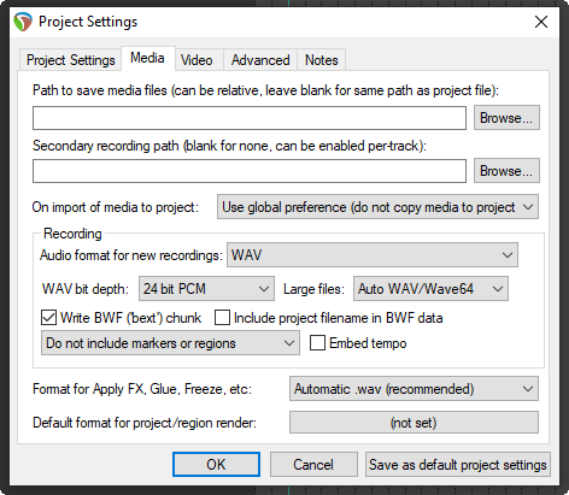
The settings shown would be suitable when the output is to be rendered to CD audio. As a rule, 24 bit is preferred for recording, 16 bit for rendering. If the recording is to be finalised in DVD format rather than CD, you should consider a sample rate of 48000 instead of 44100. This is specified on the main Project Settings page.
Some people prefer to sample at 88200 for CD and 96000 for DVD. Increasing sample rate also increases media item file size and might slow down processing.
Other formats.
You can record using any of a number of compressed formats, including MP3, OGG and WavPack. Any of these will present you with further options appropriate to that format. For example, for MP3 you will need also to specify your required bitrate.
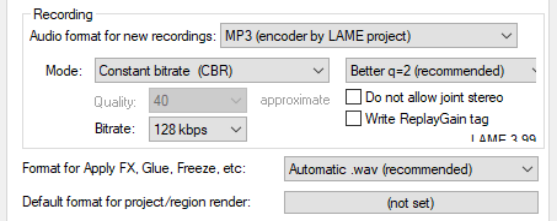
There is also a drop down list where you choose to write as cues to your recorded media files markers and regions, either one of these, or none of these, or only markers/ regions whose name begins with #. See Chapter 9 for more about markers and regions.