16.10 Volume Control with a Noise Gate
Noise gates control sound at the quiet end of the scale.
Kind: concept (user-guide-section) Chapter: 16 REAPER Plug-ins in Action Source: REAPER User Guide v7.70
Noise gates control sound at the quiet end of the scale. When you record a track there might be sections of silence, perhaps between verses. However, you might notice on playback irritating sounds have been recorded at a low level during these periods. A noise gate can detect these and filter them out. Like the compressor, the gate can be quite simple or more sophisticated. Here we are going to focus on the basic noise gate controls:
- Threshold – Used to specify a minimum sound level below which the noise gate will kick in.
- Attack – Specifies how quickly the gate kicks in. Too soon can cause the natural decay to be cut off.
- Hold – Specifies how long the gate remains open after the signal falls below the Threshold.
- Release – Determines how soon the gate closes after the signal has fallen below the threshold.
- Hysteresis – The degree of tolerance allowed before opening or closing the gate (rather like a thermostat!).
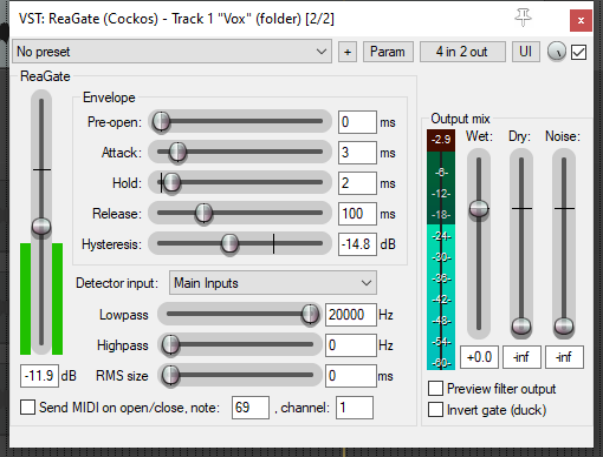
This example, uses the project All