5.4 Auto-Naming Multiple Tracks
In one action you can create and automatically name any number of tracks, (either after the last touched track or at the end of the project) that serve a common purpose – for example, a number of backing vocal or….
Kind: concept (user-guide-section) Chapter: 5 Project Arrangement Basics Source: REAPER User Guide v7.70
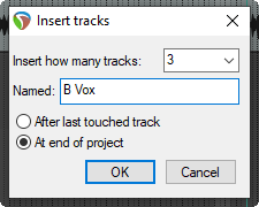
In one action you can create and automatically name any number of tracks, (either after the last touched track or at the end of the project) that serve a common purpose – for example, a number of backing vocal or percussion
tracks. Use the Insert,
Multiple tracks...
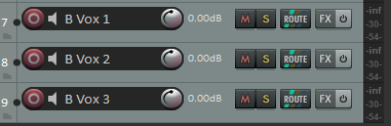
command. In this example shown, we are creating three Backing Vocals tracks at the end of the track list. These will be automatically named B Vox 1, B Vox 2 and B Vox 3.