6.12 Embedding FX GUI in TCP or MCP
You can embed the GUI of some FX (e.g.
Kind: concept (user-guide-section) Chapter: 6 Managing Track and Item FX Source: REAPER User Guide v7.70
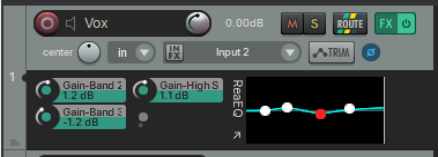
You can embed the GUI of some FX (e.g. ReaEQ, ReaComp, ReaXComp, ReaSurround and ReaFir, and some JS plugins) in the TCP/MCP, including graphical waveshapers, the spectrograph and the goniometer. Right-click on the FX in a track’s FX chain and choose Show embedded UI in TCP or MCP. For example, you could adjust visible ReaEQ parameters within the TCP. The same menu enables you to add parameter controls to the left of the embedded image, as sdhown here.
Tip: An FX embedded in a track’s UI can be saved as a FX chain (from the FX window menu). Inserting that chain into any other track will cause the FX to be automatically embedded in that track’s UI.