15.13 Assigning Actions to the Mousewheel
One special type of action assignment that you can make is to the mousewheel, optionally also using modifier keys.
Kind: concept (user-guide-section) Chapter: 15 Customization: Actions, Mouse Modifiers, Menus and More Source: REAPER User Guide v7.70
One special type of action assignment that you can make is to the mousewheel, optionally also using modifier keys. This way you are able change the REAPER default mousewheel assignments. This can be useful, for example, if you wish the default behavior of the mousewheel to be to scroll rather than to zoom. Here's a reminder of the default mousewheel assignments:
Mousewheel alone
View: Zoom horizontally with Ctrl View: Zoom vertically with Alt View: Scroll horizontally with Ctrl+Alt View: Scroll vertically with Ctrl+Shift View: Adjust selected track heights
Again, the method for changing these is essentially the same as that which you have already used. Suppose, for example, that you wish to use the mousewheel by itself to scroll horizontally.
- In the actions list (Main section), find the action View:
Scroll horizontally (MIDI/CC
relative/mousewheel). 2. In the shortcuts list, select Alt + Mousewheel and click
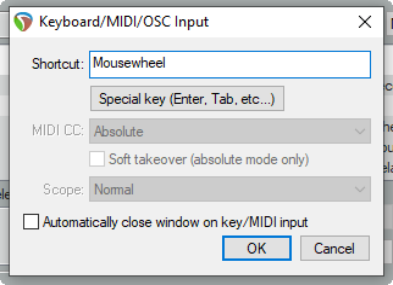
on delete. 3. Click on the Add button, then scroll the mousewheel.
The text Mousewheel will be displayed, as shown on the right. 4. Click on OK. 5. If you wished, you could now use the same method to
assign Alt + Mousewheel to the action View: Zoom Horizontally.