9.12 Project Building with Regions
Regions can be used as a very powerful project building tool, especially when you are constructing a project from samples and/or loops.
Kind: concept (user-guide-section) Chapter: 9 Tempo Based Production, Loops, Markers and Regions Source: REAPER User Guide v7.70
Regions can be used as a very powerful project building tool, especially when you are constructing a project from samples and/or loops. Two especially powerful features of regions are:
- Drag and drop a region along the timeline to move a region's entire contents.
- Hold Ctrl while dragging and dropping to copy a region and its contents, or Ctrl Alt to copy the region only, without its contents.. To illustrate this, take a look at the image on the right. We have started building a project, with an introduction, then a verse (which has been made into a region), a chorus (also a region) and a second verse. By holding the Ctrl key while clicking and dragging the icon for the Chorus region to the right, to the end of verse 2, we are able to copy the entire chorus to that point (see below).
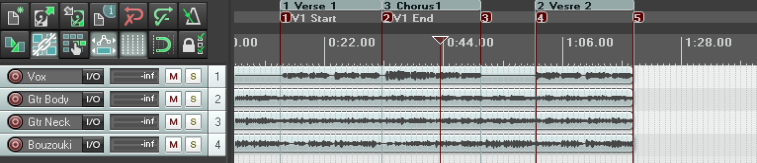
Notice that any markers and time signature markers that are inside the region will also be copied or moved when the region is copied or moved.

Note: You can create separate regions for each item in a selection. Make your selection, then run the action Markers: Insert separate regions for each selected item. This action can be assigned to a keyboard shortcut, and/or added to a toolbar, and/or added to a menu – see Chapter 15.