6.8 Serial vs Parallel FX Chains
By default, the plugins in a track or item FX chain are processed in serial – that is, one after each other.
Kind: concept (user-guide-section) Chapter: 6 Managing Track and Item FX Source: REAPER User Guide v7.70
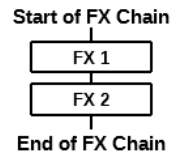
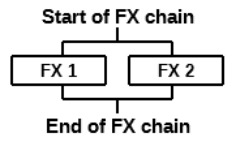
By default, the plugins in a track or item FX chain are processed in serial – that is, one after each other. For example, if you insert both ReaEq and then ReaComp into an FX chain, the audio is passed first through the EQ. With EQ added, it is then passed though the compressor. This concept is illustrated on the right. This is how most often you are likely to want to have your FX processed. However, there may be instances when rather than processing effects in serial you wish to process them in parallel. That is, you wish to process two or more effects (in this example, EQ and compression) each independently of the other, with the separately EQ’d and compressed audio then mixed back together. Using this method, you can avoid applying the compressor to the EQ’d signal. This concept is illustrated in the second diagram on the right. The steps required to run two effects in parallel are simple:
Insert both of the FX into the track or item’s FX chain. Right click over the second of these FX and from the context menu choose Run selected FX in parallel with previous FX.
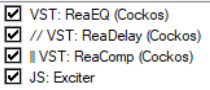
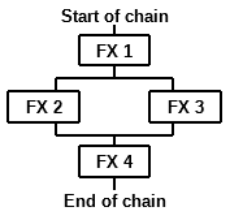
This is illustrated in the chain shown on the left. The two sets of lines indicate that after passing through ReaEQ the audio stream will be processed by ReaComp in parallel with ReaDelay before being passed on through the JS Exciter. This technique can be used in any number of cases to explore creative effects. For example, you could use it to apply reverb and compression independently of each other to an instrument, or two separate instances of compression to a vocal. Parallel FX processing can also occur within more complex models. Consider the third illustration shown on the right. Here we have four FX in a chain: the audio is first processed through FX1, then FX 2 and FX 3 (and only FX 2 and FX 3) are processed in parallel. To achieve this, FX 3 (and only FX 3) needs to be set to run in parallel to its immediately previous FX. Finally, the signals for FX2 and FX3 are merged and passed through FX 4. More complex models are available: more examples, including FX containers, are considered in Chapter 17.
Note: If MIDI items are being processed through midi FX in parallel which filter their own events you should instead use the command option Run selected FX in parallel with previous FX (merge MIDI). This should prevent MIDI data from being excluded.