18.12 The Track Envelopes Window Revisited
Let’s now take a more in depth look at the track envelope window.
Kind: concept (user-guide-section) Chapter: 18 Automation – Envelopes and More Source: REAPER User Guide v7.70
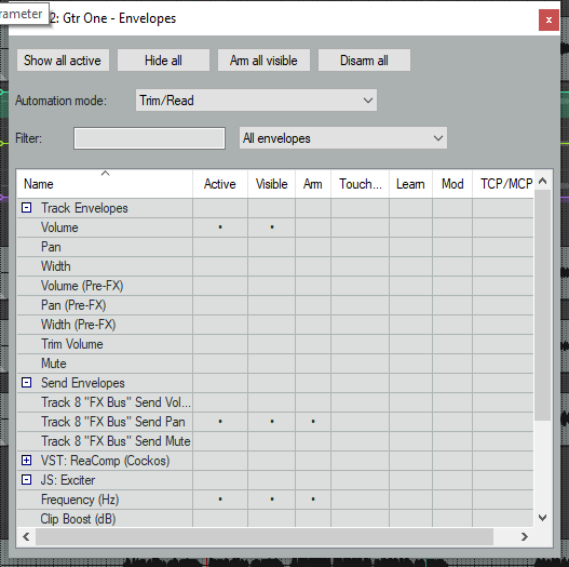
Let’s now take a more in depth look at the track envelope window. The + and - buttons to the left of the category or FX name is used to display or hide the track, send or FX parameters in the parameters list. Name lists all parameter names, including track controls, sends and/or receives and FX parameters,. Active indicates for each parameter whether an envelope exists. Click in the active cell for any parameter tol create an envelope. The Visible and Arm cells respectively make an envelope visible and arm it prior to writing automation in Write, Touch, Latch or Latch preview modes. Learn sets the parameter up to be controlled by an external MIDI control device. For this to be available, you will need to have a MIDI control device enables in your MIDI preferences. This topic is explored in more detail in the subsection FX Automation: Learn Mode. Mod activates parameter modulation for this parameter. This topic is covered in detail in the next chapter. TCP/MCP/UI adds to the track panel a control which can be used to adjust this parameters value. This control can be used when writing automation or independently of automation.
Hide all will hide all envelope panels on the track panel: Show all active will restore them to view and display their lanes in arrange view. Arm all visible will arm all visible envelopes for automation. Disarm all will disarm them. The context menu (right click in shaded area) offers options to manage FX display in this window, including:
Auto-close window when focus switches away Expand all parameters Collapse all parameters Default: all FX parameters expanded Default: all FX parameters collapsed. Set default filter for track envelopes to current filter
In the example shown here, ReaComp has been collapsed and JS: Exciter has been expanded. Notice also that a control for the Exciter’s Frequency parameter has been added to the track panel. The drop down list to the right of the Filter box allows you to focus on All envelopes or only Active envelopes or Last touched parameters, including when filtering. All other parameters and envelopes will be hidden. Choosing All envelopes will restore all envelopes to view. Shown above we have three active envelopes – track Volume, Send Pan and the Exciter’s Frequency.