14.1 A Brief Introduction to Notation
In a broad sense, the term notation can be applied to any system that uses written symbols to represent musical notes.
Kind: concept (user-guide-section) Chapter: 14 Music Notation and REAPER's Notation Editor Source: REAPER User Guide v7.70
In a broad sense, the term notation can be applied to any system that uses written symbols to represent musical notes. Thus, the piano roll view of REAPER's MIDI Editor can be seen as a type of notation, as is the use of guitar tabs, which you might have encountered elsewhere. However, in practice the term “notation” is often used to refer to modern staff notation. This was developed for use with European classical music, but is now widely used to represent music of many genres. This chapter will focus on the use of REAPER's notation editor for modern staff notation. First, here is a general introduction. The practice of notation writing is sometimes also known as scoring. Notation is a huge subject about which there is much to learn, and the journey from complete beginner to competent achiever can be a long one. Many books are available on the subject, including Music Notation (Theory and Technique for Music Notation) by Mark McGrain and Music Notation and Terminology by Karl Wilson Gehrkens (available on line as a free download from Gutenberg). A handy short general introduction to understanding music theory and notation can be found on line at method-behind-the-music.com and tutorials at http://jkornfeld.net/complete_theory_text.pdf If all this intimidates you, don't let it! You don't need to be able to read or write musical scores to be a musician. Robert Johnson, John Lennon, Paul McCartney, Bob Dylan, Jimi Hendrix, Eric Clapton, Tommy Emmanuel and many, many others are all proof of that! This User Guide does not aim for the impossible goal of teaching everybody everything they could ever wish to know about notation scoring and editing, in just a few pages! Its purpose is to help you to learn how to start using REAPER's notation editor with such knowledge and skills as you can bring to the table. Below are illustrated some of the basic elements and terminology of notation scoring:
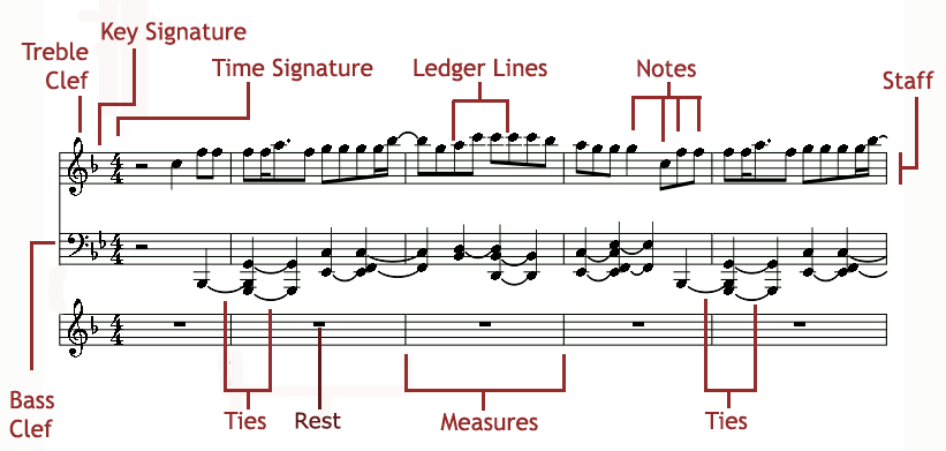
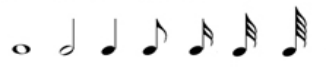
The st0aff is the five line grid on which notes can be written, and which is used to display the notes. If a MIDI item recorded using a keyboard or created by hand within the MIDI editor is opened in the notation editor, then that item will be automatically scored. You can also edit that score, or add to it, within the notation editor. The staff is divided into a number of measures for the duration of the piece. The number of beats to a measure is itself determined by the time signature (see also below). On the left end of the staff is displayed the clef. For the treble clef the first (lowest) line of the staff represents E this goes up alternately thru grid spaces and lines to F, G, A, B, C, D, E, and F. The bass clef uses the same musical alphabet but goes up G, A, B, C, D, E, F, G, and A. Where a note needs to be displayed above or below the range covered by the staff, this is done using ledger lines. A different symbol is used to represent each note, from double whole note or breve (not shown) thru (shown from left to right below) whole note (semibreve), half note (minim), quarter note (crotchet), eighth note (quaver), sixteenth note (semiquaver), thirty-second note (demi-semiquaver) and sixty-fourth note (semi-demi-
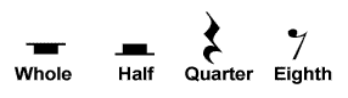
semiquaver). Above you can see where ties have been used to join together two or more adjacent notes of the same pitch, effectively creating a single longer note. To the immediate right of the clef are the key signature (if present) and the time signature. The key signature designates notes to be played higher or lower than its corresponding natural note. The time signature determines how many beats there are per measure, and what kind of note gets the beat. For example, in 4/4 time there are four beats per measure with the quarter note getting the beat. In 3/4 time also the quarter note will get the beat, but with only three beats in a measure. Finally in the diagram you can see Rests. A rest represents a period of silence in a bar. The duration of the rest corresponds to a note length and is indicated by the symbol used, as illustrated in the examples shown on the right.