1.26 Ruler Display Options
You can choose which units of measurement you prefer to use from the Arrange View context menu.
Kind: concept (user-guide-section) Chapter: 1 Setting Up and Getting Started Source: REAPER User Guide v7.70
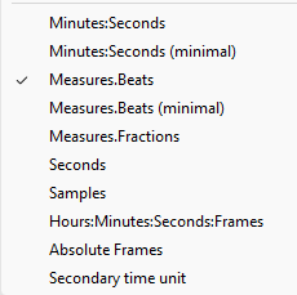
You can choose which units of measurement you prefer to use from the Arrange View context menu. Right click your mouse over the ruler and choose from any of the options at the bottom of the menu, shown here. The default setting is Measures.Beats.
Minutes.Seconds Seconds Minutes.Seconds (minimal) Samples Measures.Beats Hours.Minutes.Seconds.Frames Measures.Beats (minimaal) Absolute Frames Measures.Fractions Secondary time unit