3.31 Recording MIDI
You have a number of options for recording MIDI, depending on what equipment you have and how it is set up.
Kind: concept (user-guide-section) Chapter: 3 Recording Audio and MIDI Source: REAPER User Guide v7.70
You have a number of options for recording MIDI, depending on what equipment you have and how it is set up. In every case, however, the principle is the same:
- You will need to use either REAPER's virtual keyboard or a MIDI input device, such as a keyboard attached via a MIDI In port on your sound card or other audio device.
- You will need to create a track (or assign an existing one) for your MIDI recording.
- You will need to assign an output device for your track.
- You will need to assign a Channel for the MIDI item.
- You will need to turn Input Monitoring on to be able to hear what you are playing.
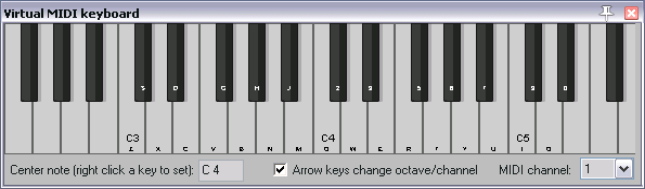
REAPER's Virtual MIDI Keyboard, can be played using your mouse or PC keyboard. This keyboard is displayed using the command View, Virtual MIDI Keyboard. The shortcut keys Alt B can be used to toggle display on and off.
MIDI Ports: MIDI architecture imposes a limit of 16 channels per device. However, you can use a MIDI patch bay to work round this restriction by allowing multiple devices to be connected. REAPER allows up to 62 MIDI ports for input and 64 for output. Virtual MIDI ports can be defined and used via software such as MIDI Yoke or loopMIDI.