13.25 Humanize Notes
Humanize Notes (from the Edit menu) can be used to introduce subtle variations – some might say imperfections! – to a MIDI item that is just too exact, too perfect.
Kind: concept (user-guide-section) Chapter: 13 Working with MIDI Items Source: REAPER User Guide v7.70
Humanize Notes (from the Edit menu) can be used to introduce subtle variations – some might say imperfections! – to a MIDI item that is just too exact, too perfect. For example, no human pianist will ever complete an entire live performance on an acoustic piano with every key being struck with exact precision and perfect timing. Therefore, you might not want your MIDI items to be too perfect.
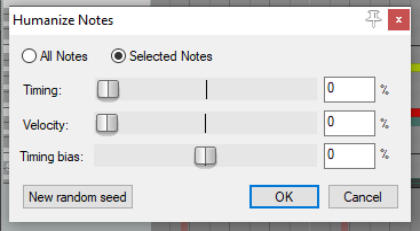
The Humanize Notes dialog box (right) can be used to introduced random variations in timing and velocity to an existing MIDI item to make it sound … well, more human!