21.6 Project Rendering Examples
Sample at 48000 HZ, Channels: Stereo, Higher Quality.
Kind: concept (user-guide-section) Chapter: 21 Exporting Files, Mixing Down and Rendering Source: REAPER User Guide v7.70
Example Specification
DVD Audio
Sample at 48000 HZ, Channels: Stereo, Higher Quality. Output: WAV format, 24 bit
CD Audio
Sample at 44100 HZ, Channels: Stereo, Higher Quality. Output: WAV format, 16-bit
Apple Mac
AIFF Format. Preferred settings will vary with individual circumstances.
Sample Rate 44100 HZ, Channels: Stereo, Higher Quality. Output format: MP3 Other options trade off files size and download time against audio quality, but a typical selection might be CBR (Constant Bit Rate) 96 or 128, Joint Stereo, Quality High
Web Site / Web Audio
Example Specification
Specifications as for CD Audio. Burns output directly to CD, or creates image file to use with CD burning software. You can use markers or regions to define tracks, including using as track markers only markers whose name begins with "#".See section 21.9.
Audio CD Image (Cue/Bin) format
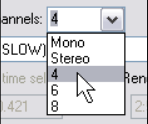
We look at channel splitting and creating multichannel tracks in Chapter 17. Tracks can be exported in multichannel format. Select the tracks in the TCP, open the Render to file dialog and include the options: Channels - Select the number of channels, e.g. 4, the select Render stems (selected tracks) to similarly named files. Select Render multichannel tracks to multichannel files. Optionally, Add items to new tracks in project when finished.
Multichannel Tracks
The Action List includes many actions relevant to file rendering, including:
File: Render project using the most recent render settings with the additional options to also autoclose render dialog when finished or with a new target file
File: Add project to render queue using most recent render settings File: Save project and render RPP-PROX File: Show project render metadata window