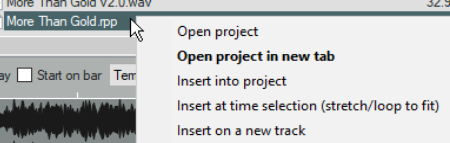
4.9 Importing REAPER Project Files
MIDI System Exclusive Message (.SYX) MPEG Video (.MG, .MPEG) LCF Capture Video (.LCF) MKV Video (.MKV) MPEG Audio (, MP2, .MP3) MusicXML (.XML, .MUSICXML, .MXL) OGG Opus (.OPUS) OGG Vorbis (.OGG, .MOGG).
Kind: concept (user-guide-section) Chapter: 4 Managing Media: The Media Explorer Source: REAPER User Guide v7.70
MIDI System Exclusive Message (.SYX) MPEG Video (.MG, .MPEG) LCF Capture Video (.LCF) MKV Video (.MKV) MPEG Audio (, MP2, .MP3) MusicXML (.XML, .MUSICXML, .MXL) OGG Opus (.OPUS) OGG Vorbis (.OGG, .MOGG)
The media explorer allows you to either open an existing .RPP project on a new project tab, or to insert it into the currently active project. In the latter case, REAPER renders the file thru its master and insert the rendered item into your project on a new track. You can insert the entire file, or whatever time selection you choose to make in the preview panel. Unless you disable these options on the Options menu, when inserting the file REAPER will apply all relevant media explorer options, such as whether to tempo match and any pitch and/or play rate adjustments.