18.3 Automation Envelope Methods
REAPER's various automation modes essentially make available to you two main ways of using envelopes for automating your projects.
Kind: concept (user-guide-section) Chapter: 18 Automation – Envelopes and More Source: REAPER User Guide v7.70
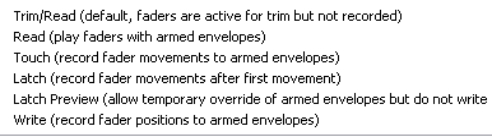
REAPER's various automation modes essentially make available to you two main ways of using envelopes for automating your projects. These are writing automation and manually creating envelopes.
- Writing Automation: When writing automation, REAPER will record your actions – such as adjusting a volume control – as your project is played. An envelope is created to reproduce these during playback. The three different methods are write, touch and latch (including latch preview).
- Manually Creating Envelopes: Instead of using track control to create envelopes, shaping them manually gives you more precise control. You can draw your envelope curves freehand, add points, and use your mouse to manually move points. Trim/Read mode is used when you are creating or editing envelopes in this way. You can write envelopes in, say, latch mode then edit them in Trim/Read mode. The active mode is displayed on a track's envelope button. We'll explore the different automation modes shortly. Different modes can be used on different tracks. All envelopes can be manually edited , or removed altogether.