16.5 Time Based Effects: Delay
These include reverb, delay and chorus.
Kind: concept (user-guide-section) Chapter: 16 REAPER Plug-ins in Action Source: REAPER User Guide v7.70
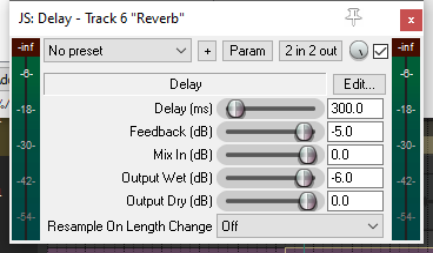
These include reverb, delay and chorus. Sound takes time to travel: surfaces like walls and ceilings create reflections which make the sound patterns more complex. Time based FX use various techniques to artificially simulate this, thereby creating a more “live” sound. But go easy! About a dozen JS delay plugins are available, ranging for simple delay to floaty delay, or delay with chorus, sustain, stereo bounce, and more. Chorus options include mono, stereo and ozzifier. Shown here is the JS Delay.
Parameter Description
Delay (ms)
Sets the amount of time to pass between the dry sound and the delayed sound.
Feedback
Determines the amount of the delayed signal that will be fed back into the delay itself. This helps to prevent the delay from just being an echo.
Mix in (dB)
Determines the overall output level.
Output wet (dB
Determines the Output level of the Post FX signal. Lowering this relative to the dry output will make the effect more subtle.
Output dry (dB)
Determines the Output level of the Pre FX signal
Note: The plug-in ReaDelay is a powerful alternative to JS Delay. For example, it allows the use of multiple taps to use different combinations of settings together. This (along with the other Rea effects) is described in the free ReaEffects Guide - https://dlz.reaper.fm/userguide/REAPEREffectsGuide2021.pdf