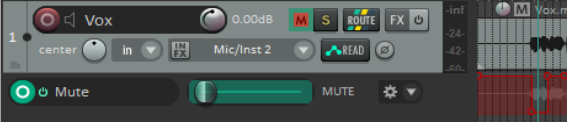
18.7 Writing Mute Automation
You can use a track’s Mute button to automatically mute unwanted passages of a track.
Kind: concept (user-guide-section) Chapter: 18 Automation – Envelopes and More Source: REAPER User Guide v7.70
You can use a track’s Mute button to automatically mute unwanted passages of a track. To do this
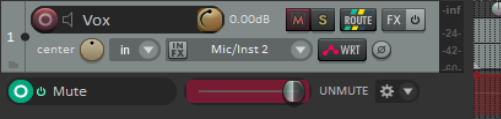
- Click on the track’s Envelopes/Trim button to display the envelopes window.
- Select the Mute envelope and set the mode to Write. Then close the Envelopes window.
- The Envelopes/Automation button will read Write and the armed mute button will be highlighted in red. Notice (above) how this mode is displayed.
- Now play the track. Click on the track’s Mute button at the start and end of any passages to be muted.
- When finished, stop playback. Automation mode for this track should now be set to Read.
In the example (right), a vocal track is muted when it is not intended to be heard. Read mode has been selected. During playback, the color of the Mute button changes to red during the muted passages.