22.6 Audio Preferences
Mostly leave at their default settings.
Kind: concept (user-guide-section) Chapter: 22 REAPER's Preferences and Other Settings Source: REAPER User Guide v7.70
Mostly leave at their default settings.
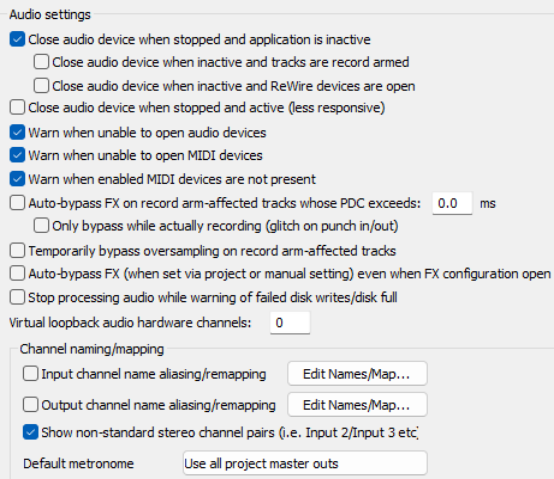
- Whether to Close audio device when
stopped and application inactive. Enables you to switch between REAPER and other open programs.
Close audio device when inactive
and tracks are record armed. Allows ●An option to Close audio device
when inactive and REWIRE
devices are open.
Close audio device when stopped and active.
- Enabling Warn when unable to open
audio/MIDI devices and Warn
when enabled MIDI devices are
not present to help troubleshooting hardware interface issues.
Autobypass plug-ins whose PDC
exceeds a threshold when recordarmed. Option to Only bypass while actually recording.
- An option to Temporarily bypass oversampling on record arm affected tracks.
- An option to Auto bypass FX even when FX configuration is open (see tooltip for more info).
- An option to Stop processing audio in the event of disk failure/disk full.
- An option to specify a Virtual loopback audio hardware setting (see tooltip for more info).
- Input/Output Channel naming/mapping and Non standard stereo channel pairs. These features
let you give meaningful names to your audio input and output devices. It is explained in detail in Chapter 1.
- Output to be used for Metronome Output.
Note that Audio, Device preferences and settings are explained in Chapter 1.12 and Audio, MIDI Device preferences and settings in Chapter 1.15.