22.13 Customizing Undo History Behavior
As already discussed (Chapter 2), In General preferences you can customize your Undo History. including.
Kind: concept (user-guide-section) Chapter: 22 REAPER's Preferences and Other Settings Source: REAPER User Guide v7.70
As already discussed (Chapter 2), In General preferences you can customize your Undo History. including:
- Add undo points for item/track/envelope selection and/or cursor movements.
- Save Undo History with project files.
- Allow load of Undo History.
- Store multiple redo paths.
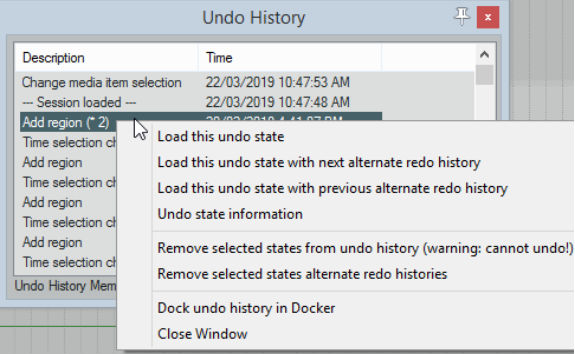
These features can be selected from the Undo Settings section of the Options, Preferences, General, Undo screen. Enabling the option to Store multiple redo paths where possible means that whenever you to go back to an earlier point any actions you take from that point on will be stored as an alternate set: REAPER will remember both paths independently of each other. Moreover, every time you return to that point, another new undo path will be created. An example is shown above. The highlighted action Add Region is flagged with (*2). This means that as well as the original set of actions, two more undo history paths exist where twice we have gone back to that point. By right-clicking where shown, we are able to choose which undo state we wish to load, thus enabling us to restore those commands and actions. There are also options to Remove selected undo states from undo history. If enabled, Save undo history with project files and, Allow load of undo history will make the undo history available to you next time you use this project, even if you have since closed and restarted REAPER.