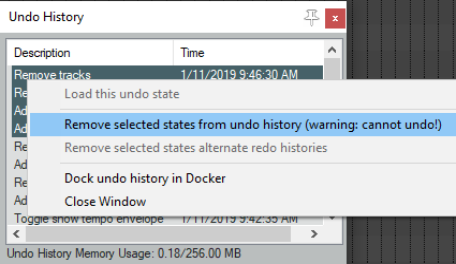
2.28 The Undo History Window
REAPER’s Undo feature is very powerful.
Kind: concept (user-guide-section) Chapter: 2 REAPER Project Basics Source: REAPER User Guide v7.70
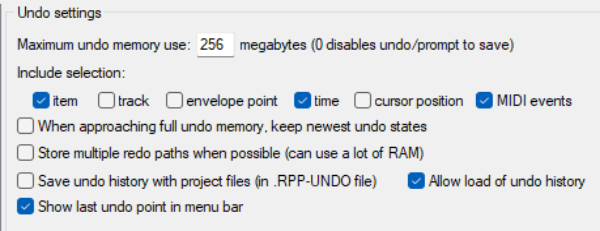
REAPER’s Undo feature is very powerful. The Edit, Undo History command (or use Ctrl Alt Z) toggles open and closed the Undo History Window. The Undo settings page of Options, Preferences, General includes options to manage your undo history. Settings options are shown below. In particular, you can:
-
Specify the maximum amount of memory to be allocated to Undo.
-
Specify whether to include item, track, envelope point and/or time selection and/or cursor positions changes in the undo history.
-
Ensure that if the allocated undo area becomes full, the most recent actions will be retained.
-
Save your Undo History with the Project File to ensure that this file is loaded with the project. Even at some later date, you will still be able to revert the project to an earlier state if you wish.
-
Store multiple undo/redo paths. You can even store alternate sequences of commands and actions, then switch between them!
-
Show last undo point in menu bar. You can double click on any event displayed in the undo history window to load that undo state. This option is also available on the undo history window’s right-click menu. Other menu options menu include Remove selected state(s) from undo history (can apply to a selection of actions), and Dock/ undock the undo history in the docker.