11.13 Solo Buses
This feature can be made available by enabling Solo via dedicated solo bus on the Audio, Mute/Solo page of your Preferences.
Kind: concept (user-guide-section) Chapter: 11 The Mixer and The Master Source: REAPER User Guide v7.70
This feature can be made available by enabling Solo via dedicated solo bus on the Audio, Mute/Solo page of your Preferences.
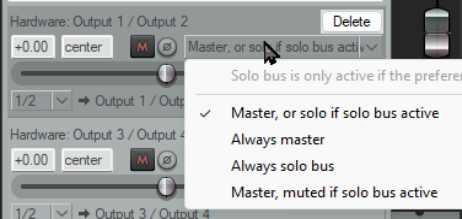
By creating a separate Solo Bus in the master track output you will have the option of listening to only soloed tracks or to the entire mix without having to be constantly turning solo on and off in the main project.
Each hardware output that you specify in the Master Outputs window can be directed (as shown here) to the master or solo bus, as you wish. The options are:
Master, or solo if solo bus active (the default)
Always master Always solo bus Master, muted if solo bus active
Make your choice from the menu, accessed by right-clicking over the fader.
An example of how this might be used would be to set output 1 to Always master and output 2 to Always solo bus.