13.40 MIDI Routing, MIDI Buses and ReWire
REAPER's track routing capabilities includes the use of MIDI buses.
Kind: concept (user-guide-section) Chapter: 13 Working with MIDI Items Source: REAPER User Guide v7.70
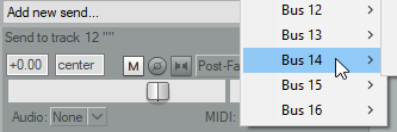
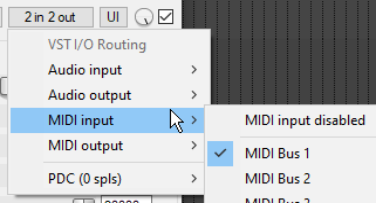
REAPER's track routing capabilities includes the use of MIDI buses. Your MIDI tracks can use up to 256 MIDI buses, each comprising 16 MIDI channels. When sending MIDI data from one track to another, you can specify the bus/channel combinations for both source and destination tracks (rather than just a channel). See the section MIDI Routing: Track Sends and MIDI Buses. These options are available in the drop down lists in the track’s routing windows. Plug-ins can receive MIDI on a specified MIDI Bus and transmit MIDI on a specified (different) MIDI Bus. MIDI data sent from one track to another in this way can be directly routed to any VST or AU synth in that track's FX chain: right-click over the plug-in's “In/Out” button and choose the required MIDI Bus from the MIDI
Input menu (below). The same context menu can also be used to assign MIDI output from that plug-in to any bus, and/or to assign the synth's audio input or output to any track channel or channels. When a track FX chain includes volume and pan MIDI controls (e.g. ReaControlMIDI), moving the volume/pan fader within the track’s routing window will generate MIDI CC7/CC10 events. When a send's MIDI routing button is enabled, these CC events are sent to the destination track. ReWire users note that MIDI data routed in this way can be also be mapped to ReWire, using any permutation of buses/channels that you require. For more information about using ReWire with REAPER, see Chapter 17.