12.10 Auto Saving Screen Sets
You have the option to automatically save changes to your Track Views or Windows screen set layouts.
Kind: concept (user-guide-section) Chapter: 12 Managing The Overall Project Source: REAPER User Guide v7.70
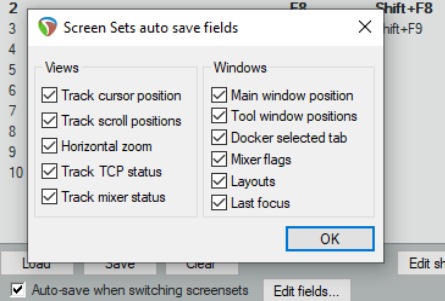
You have the option to automatically save changes to your Track Views or Windows screen set layouts. To do this, simply ensure that the Auto-save when switching screen sets option is selected (see below). This can be used to ensure for example, that if you change the selected tab to be displayed in the docker before switching to a different Windows screen set, when you return to the first screen set, REAPER will have remembered which docker tab was last selected.
If using auto-save, consider using the Edit fields... button to decide which elements for which you want changes automatically saved (see right).
The available options are all items that were included in your options when you created your screen sets.