10.2 Changing Pitch for Individual Media Items
An item’s pitch can be changed from the Media Item Properties dialog.
Kind: concept (user-guide-section) Chapter: 10 Pitch and Time Manipulation Source: REAPER User Guide v7.70
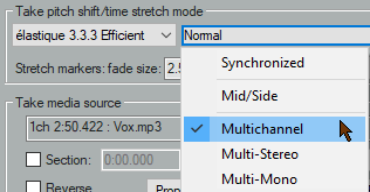
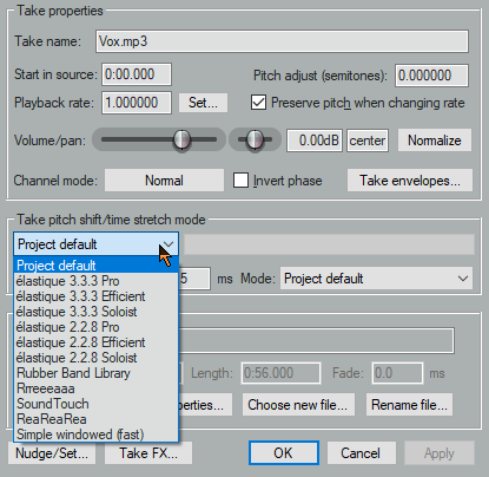
An item’s pitch can be changed from the Media Item Properties dialog. To open this for any item, select the item and press F2. The pitch adjust value is measured in semitones. Enter a number to raise or lower the item’s pitch, or type in a multiplier, such as x1.5. Choose a pitch shift mode from the drop down list:
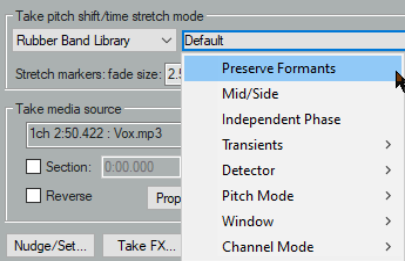
●Project default (from Project Settings). ●Élastique 2.2.8 or 3.3.3 Pro (best). ●Élastique 2.2.8 or 3.3.3 Efficient (less resource intensive than elastique Pro). ●Élastique 2.2.8 or 3.3.3 SOLOIST (suitable for monophonic items). ●Rubber band library. ●Rrreeeaaa. ●SoundTouch 1.9.0 (allows stretch rates up to 1,000 times and up to 128 channels). ●ReaReaRea. ●Simple windowed. For any of the élastique modes, you should also select an option from the adjacent Mode dropdown: options will vary according to the mode selected. Rrreeeaaa is useful if you want big stretches that do not preserve transients. Application of this mode is defined by an accompanying dropdown list which lets you change FFT, analysis and synthesis options from their defaults. It’s unlikely that you would want to use this mode with stretch markers or ReaTune. For rubber band library, available settings include transients, detector, pitch mode and window. ReaReaRea is similar to a classic digital sampler timestretch algorithm. It processes independent of the signal being stretched, and can be used creatively, being able to be configured in a tempo-synchronized fashion and with different fades, shapes and randomization options**.**
Keyboard shortcuts allow you to easily and quickly change the pitch of any selected item or group of items without needing to open the Media Item Properties box:
Shift 9: Move pitch down one semitone. Shift 7: Move pitch down one cent. Shift 0: Move pitch up one semitone. Shift 8: Move pitch up one cent. The Actions list includes an action (Item properties) to set the item playrate (tempo/bpm) from your source media. You can also use a take pitch envelope for pitch changes. Right click on the take (or media item if only one take) and choose Take, Take pitch envelope from the menu. To adjust the pitch envelope settings, right-click on the envelope and choose Envelope defaults, Pitch envelope range/snap from the context menu. This opens a dialog where you can adjust the various parameters. For more adventurous pitch shifting escapades you can try using one of the pitch manipulation plug-ins that are supplied with REAPER. Simply open the FX window for a track, click on Add, then in the filter list type pitch to discover what is available. Rubber Band Library. One example is the JS Pitch: an Octave down plug-in. Search the Add FX dialog to see what else is available. The most powerful of the available pitch shift plug-ins is ReaPitch.