21.14 Surround Rendering
When rendering a project for surround format, most settings will be made as for any other project (such as a stereo mix).
Kind: concept (user-guide-section) Chapter: 21 Exporting Files, Mixing Down and Rendering Source: REAPER User Guide v7.70
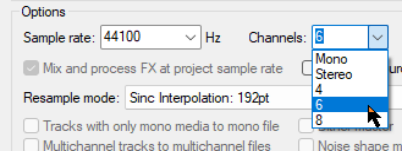
When rendering a project for surround format, most settings will be made as for any other project (such as a stereo mix). The one important difference is that you should be sure to select the correct number of channels. For example, if the project is for 5.1 surround, 6 channels should be selected (as shown here). REAPER will render this project into a single multichannel file. You may later need to convert the interleaved multichannel file into multi-mono files of the type required by Dolby and DTS encoders. REAPER itself does not do this easily, but there are a number of good tools available which will do this for you, such as Wave Agent - https://www.sounddevices.com/product/wave-agent-software/.