18.21 Envelope Preferences0
REAPER's envelopes preferences fall into several different categories within your Options, Preferences window.
Kind: concept (user-guide-section) Chapter: 18 Automation – Envelopes and More Source: REAPER User Guide v7.70
REAPER's envelopes preferences fall into several different categories within your Options, Preferences window. These are explained in more detail in Chapter 22. Meanwhile, it's worth taking note of the following. The Appearance pages of your Options, Preferences window includes a number of useful options for determining how your envelopes are presented on screen. In particular, pay attention to the options to:
- Show solid edge on time selection highlight (Appearance page). Makes the boundaries of the time
selection more obvious.
- Show guide lines when editing (Appearance page). Facilitates editing.
- Draw faint peaks in automation lanes (Peaks/Waveforms page). Can
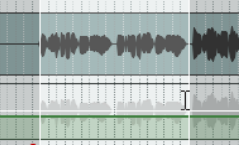
help to relate an envelope's position to the track's volume level.
- Fill automation envelopes (Appearance page): this faintly colors the
area below the envelope. The Editing Behavior, Automation page (see Chapter 22) includes important options. It gives you the option, for example, to Automatically add envelopes when tweaking parameters in automation write mode. This enables you to create envelopes on the fly without having to select the required parameters from any menu. Some of the options on the Project, Track/Send Defaults are also relevant to envelopes. These include:
- Whether to have any envelopes (such as Pan and Volume) automatically displayed for all new tracks.
- Your choice of default envelope shape for new points.
- Your choice of default automation mode for new tracks.
- Whether new envelopes are to be automatically armed.