16.7 The JS Master Limiter and ReaLimit
Several plug-ins are available which are designed to limit the maximum volume either on any track or on the master (e.g.
Kind: concept (user-guide-section) Chapter: 16 REAPER Plug-ins in Action Source: REAPER User Guide v7.70
Several plug-ins are available which are designed to limit the maximum volume either on any track or on the master (e.g. MGA JS Limiter, Simple peak limiter, Soft clipper). The JS: Master Limiter can be added to the FX Window for your Master to perform two functions. These may at first appear to be contradictory, but they are not:
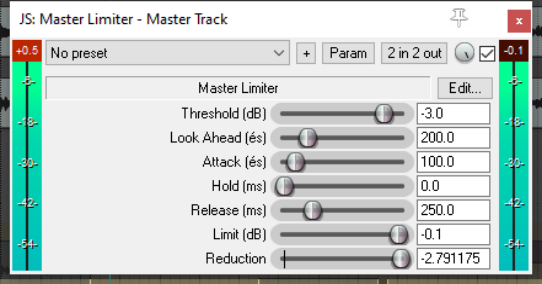
- To raise the overall volume of the mix,
but also …
- To prevent the mix from “clipping”, i.e.
getting too loud at any point. This example uses the JS: Master Limiter which includes the following controls and parameters:
Parameter Description
Threshold
Determines the level at which the other limiter settings will be applied. It may seem paradoxical, but the lower the threshold, the higher will be the perceived overall volume. As you lower the threshold, more of the song is lifted to the limit specified.
Look Ahead
Determines how far ahead the limiter looks – this helps smooth out sudden peaks.
Attack
Determines how quickly the limiter kicks in as the signal increases.
Release
Determines how quickly the limiter recovers after a peak is encountered.
Limit
This determines the maximum volume that cannot be exceeded.
Another available limiter is ReaLimit, which is a brickwall limiter. Regular limiters drastically reduce the dynamic range: brickwall limiters take it a step further. A regular limiter will mostly keep the volume at or below the threshold, but some sound may still pass the threshold, especially if you’re pushing the gain on the track. When using a brickwall limiter, nothing will ever be louder than the threshold. More information about ReaLimit can be found in the chapter dealing with the mixer and the master.