The JS Gain Reduction Scope
The JS Gain Reduction Scope helps you to analyze how your dynamics are being affected by the plug-ins in your FX chain.
Kind: concept (effect-summary) Source: REAPER Effects Summary Guide v3.04
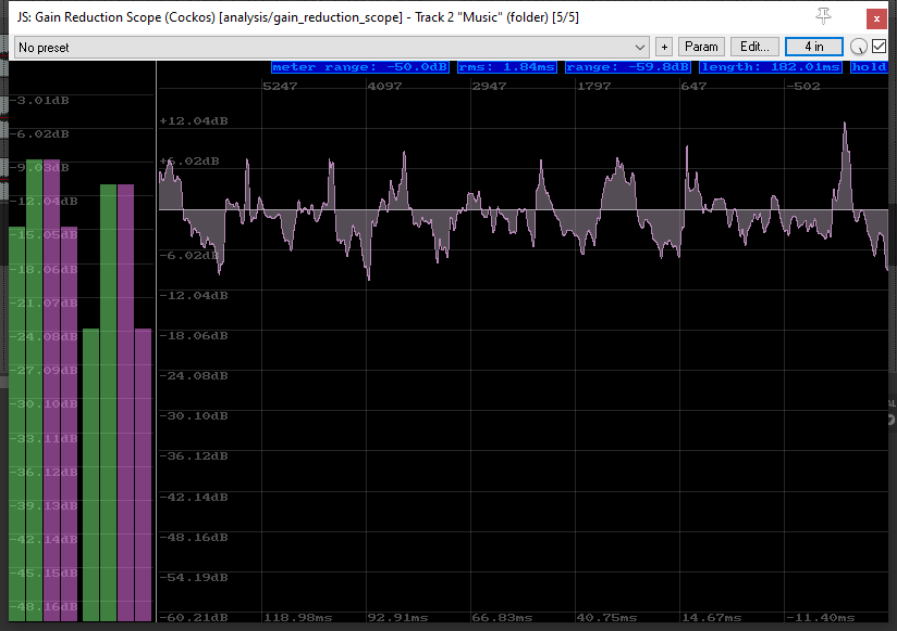
The JS Gain Reduction Scope helps you to analyze how your dynamics are being affected by the plug-ins in your FX chain. The first two columns represent the dry, unprocessed signal. The last two represent the signal after it has been processed thru your FX chain. In order to be able to do this we first need to split our signal into two chains.
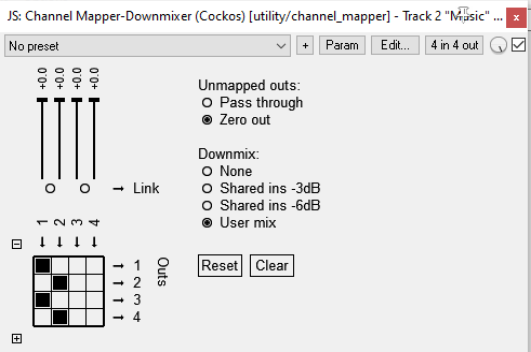
First, set the number of track channels to four. This is done in the track’s routing window, remember!
Then, as the first item in the track’s FX chain, add the Channel Mapper Downmixer, Make sure that the output from channels 1/2 goes to both channels 1/2 and ¾, as shown here.
Next, add to the chain whichever FX you require, ensuring in each case that the signal comes in fro channels 1/2 and goes out to channels 1/2 only.
This will ensure that channels 1/2 will carry the wet stream and channels 3/4 will carry the dry stream. It is important that you do not mix these streams back together!
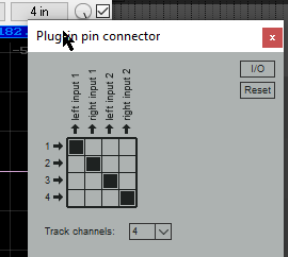
Now, at the end of your FX chain, insert the JS: Gain Reduction Scope. Click on the 4-in button to display its plug-in pin connectors. Make sure that the input from channels 1/2 is output to channels 1/2 only, and that the input from channels 3/4 is output to channels 3/4 only, as shown here.
When you play the track, the two audio streams will each be analyzed separately, and the differences will be displayed. Now we just need to examine what exactly is being displayed!