ReaVerbate
ReaVerbate is the simpler of the two Cockos reverb pluh ins, the other being ReaVerb, which we will get to later.
Kind: concept (effect-summary) Source: REAPER Effects Summary Guide v3.04
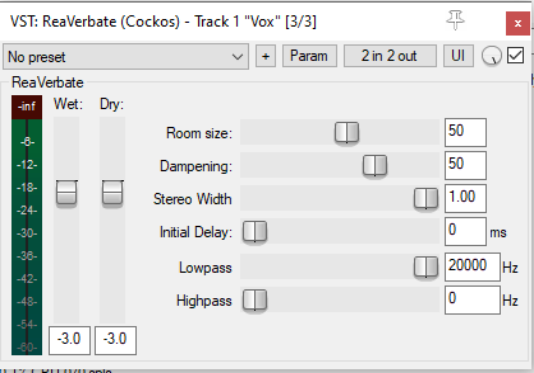
ReaVerbate is the simpler of the two Cockos reverb pluh ins, the other being ReaVerb, which we will get to later. ReaVerbate can be used to help create a feel that your song has been recorded in an environment such as a hall with natural reverberation rather than in a cold studio. Don’t be deceived by its apparent simplicity. If you experiment, you will be surprised at its capabilities. Its essential characteristics are described below.
Wet Determines the amount of the processed (wet) signal mixed into the outgoing audio stream.
Dry Determines the amount of the unprocessed (dry) signal mixed into the outgoing audio stream.
Room size Specifies the size of the room whose natural reverberation you are aiming to imitate.
Dampening Moderates the reverb effect to allow for the fact of items such as curtains and carpet that might be present in the room.
Stereo Width This control can be used to reduce the stereo field of the reverb effect.
Initial Delay Allows for a delay ODF a specified number of milliseconds before the reverb is produced. Higher settings can sometimes create a feeling of more space.
Lowpass Used to ensure that the reverb is not applied to higher frequencies (above the lowpass setting).
Highpass Used to ensure that the reverb is not applied to lower frequencies (below the highpass setting). Reverb will be applied to all frequencies in the range between the highpass and lowpass filter settings.