ReaPitch
ReaPitch is used to raise or lower the pitch of an original sound.
Kind: concept (effect-summary) Source: REAPER Effects Summary Guide v3.04
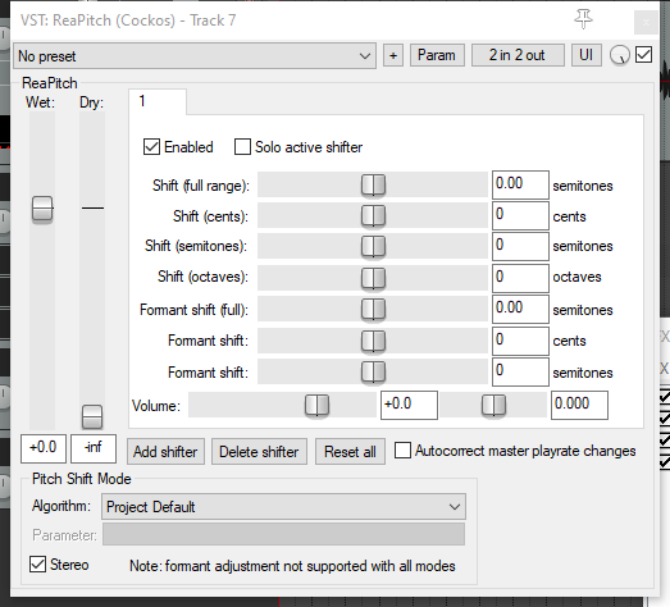
ReaPitch is used to raise or lower the pitch of an original sound. It can be used, for example, to create harmony effects on vocals, or to fatten the sound of an instrument. As well as being able to make changes to pitch, you can also adjust the formants of your material. Formants are perhaps a more difficult concept to grasp than pitch: you can think of them as being the spectral peaks of a sound, that is, the elements that give a sound such as an individual voice the special characteristics by which it is uniquely identified. Like ReaDelay, the default settings for this plug-in include a single page of settings (shifter), but you can add more shifters if you wish, each with its own settings. The volume strength and pan position of each shifter can be adjusted independently of each other. It’s worth noting that ReaPitch is another plug-in that lends itself well to being used with pin connectors to direct the wet signal to a separate track (see section 6.). This would potentially give you more options (for example, panning) for mixing vocal harmonies. You could even have multiple instances of ReaPitch, each directed via separate paired channels (3/4, 5/6, 7/8, etc.) to its own track.
Wet (volume) The combined level of processed (wet) sound (from all shifters) that is added to the output.
Dry (volume) The amount of unprocessed (dry) sound that is added to the output.
Enabled A toggle to enable/disable individual pages of shifter settings.
Solo active shifter A toggle to solo the currently selected shifter (settings page), effectively disabling all others. The next seven controls listed are used to raise or lower pitch or formants. These controls are cumulative. For example, setting Shift (cents) to +50 and Shift (semitones) to +1 would raise pitch by 1.5 semitones.
Shift (full range) Raise or lower pitch by the specified number of semitones.
Shift (cents) Raise or lower pitch by the specified number of cents. A cent is 1/100th of a semitone.
Shift (semitones) Raise or lower pitch by the specified number of semitones.
Shift (octaves) Raise or lower pitch by the specified number of octaves.
Formant shift (full) Raise or lower formants by the specified number of semitones.
Formant shift (cents) Raise or lower formants by the specified number of cents. A cent is 1/100th of a semitone.
Formant shift (semitones) Raise or lower formants by the specified number of semitones.
Volume Determines the level of volume from this shifter (settings page) that will be added to the processed (wet) signal.
Pan (unlabelled) This fader (to the right of the volume fader) sets the pan position of the output of this shifter (settings page) in the processed (wet) signal).
Add shifter Adds another settings page.
Delete shifter Deletes current settings page. You must leave at least one page.
Reset all Restores default settings, including the default number of shifters. The remaining parameters (below) are set for the ReaPitch instance as a whoe, not for individual shifters.
Autocorrect master playrate change Enable this toggle to ensure that your ReaPitch settings are applied regardless of any changes made to the master play rate.
Pitch Shift Mode Algorithm A drop down list of choices. Project Default will use the algorithm selected in the Project Settings dialog. Other options at time of writing are: Sound Touch
Simple windowed Elastique 2.2.8 Pro Elastique 2.2.8 Efficient Elastique 2.2.8 OLO Elastique 3.3.3 Pro Elastique 3.3.3 Efficient Elastique 23.3.3 SOLO Rubber Band Library
Stereo A toggle to enable/disable stereo output