ReaVoice
ReaVoice is a MIDI controlled multi-voice pitch shifter.
Kind: concept (effect-summary) Source: REAPER Effects Summary Guide v3.04
ReaVoice is a MIDI controlled multi-voice pitch shifter. You can use it in conjunction with a recorded vocal track to create pitch shift harmonies. In overview, this is how it works:
Record the Vocal Track. Insert a new track immediately below the Vocal Track. Create a send from the Vocal Track to the new track. Initially at least, this should be Pre FX. Insert ReaVoice into the FX Window of the new track. Arm this track for recording. Select your MIDI keyboard as the Input Device and turn Input Monitoring on. Mute all tracks except these two. Play the song. As you do so, play the keyboard, experimenting until you find an appropriate range of notes. Work out what you want to play, press W to return to the beginning, then Ctrl R to record. Stop recording when finished. If you do not have a MIDI keyboard, you can either use REAPER’s Virtual keyboard, or you can enter the notes by hand using the MIDI Editor. If you wish, you can record more than one take, selecting Play All Takes for the MIDI track items.
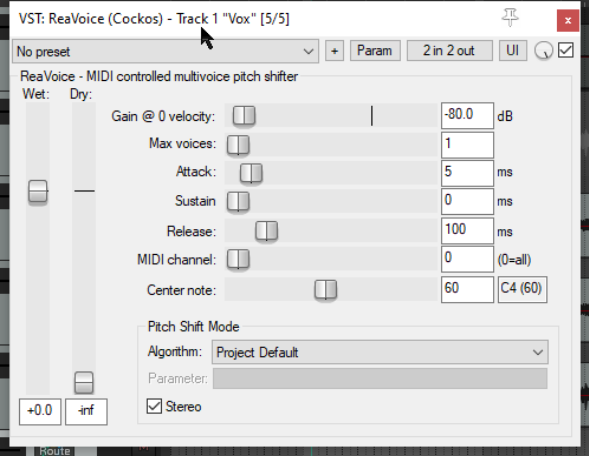
Wet Determines the amount of the processed (wet) signal that will be mixed into the outgoing audio stream.
Dry Determines the amount of the unprocessed (dry) signal that will be mixed into the outgoing audio stream.
Gain The amount by which the volume of the incoming signal is increased or decreased.
Max voices The number of vocal harmonies required, maximum is eight.
Attack Determines how quickly the plug-in responds to the incoming audio signal.
Sustain Determines for how long the harmonies will be held.
Release Determines how quickly effects generated by the plug-in will take to die down after the sustain time is finished.