ReaLimit
The purpose of a limiter is to enable you to lift the overall volume of your mix while at the same time ensuring that it does not exceed a defined threshold.
Kind: concept (effect-summary) Source: REAPER Effects Summary Guide v3.04
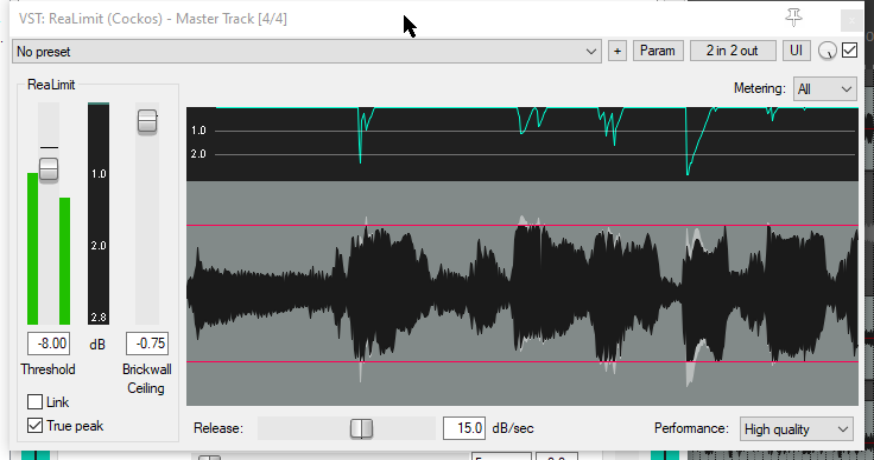
The purpose of a limiter is to enable you to lift the overall volume of your mix while at the same time ensuring that it does not exceed a defined threshold. One special feature of ReaLimit is that it gives you in real time visual feedback of how your output is being affected by the limiter.
Threshold This determines the level at which you want the limiting to begin: the lower the threshold setting, the greater will be the gain.
Brickwall Ceiling This defines a maximum level above which the signal will not be raised.
Link If enabled, this links the threshold and ceiling faders, so that both will be moved together in the same direction if you move either one.
True Peak This causes true peak values to be used for the display: for an explanation of “true peak” see the section The JS Loudness Meter.
Release This determines the rate at which limiting is released after the signal drops back below the threshold. The greater the release time, the smoother and more gradual is the transmission.
Performance This can be set to high quality or low latency. In most cases you can leave this at its default setting.
Note: The red lines in the display represent the boundaries within which the signal is being limited. The blue graph above the waveform indicate where the signal has been limited and by how much. The areas on the waveform shaded white indicate the extent to which the signal has been limited on those occasions.