ReaControlMIDI
ReaControlMIDI is a plug in for use with MIDI items or tracks which contain MIDI items.
Kind: concept (effect-summary) Source: REAPER Effects Summary Guide v3.04
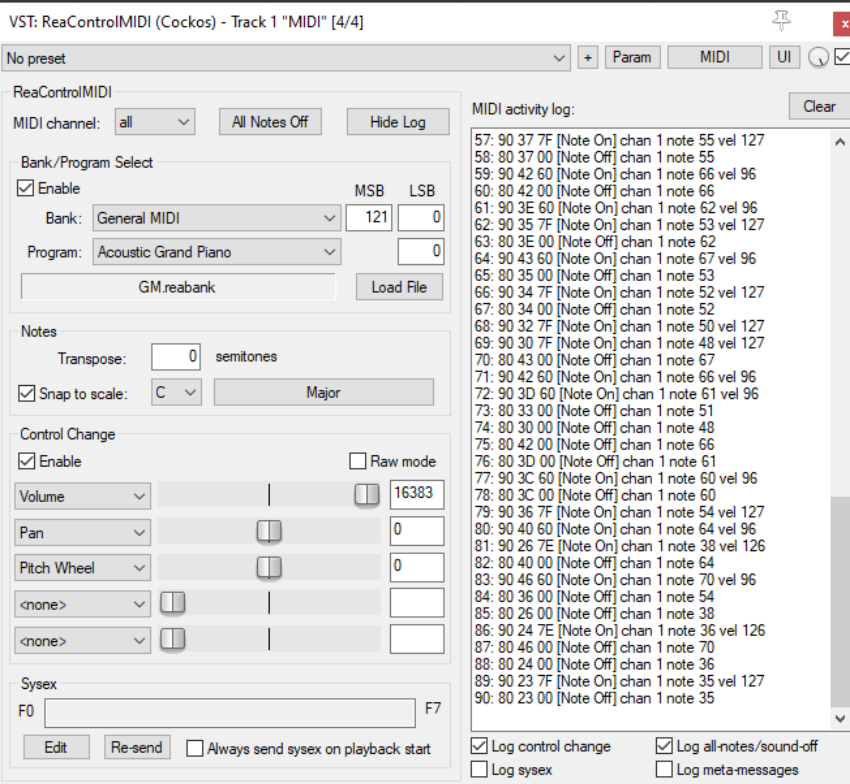
ReaControlMIDI is a plug in for use with MIDI items or tracks which contain MIDI items. It can be used to create and send MIDI control messages in real time.
MIDI Channel Select All MIDI channels or any individual channel. Separate instances of ReaControlMIDI can be applied to different channels.
All Notes Off Sends All Notes Off message – useful for dealing with any “hanging” MIDI device.
Show/Hide Log Opens and closes display of MIDI activity log: in the example shown above, the log is displayed.
Clear When the log is visible, the Clear button will clear its contents.
Enable Bank/Program A toggle which allows a bank and program to be selected and used.
Bank Drop down list to select MIDI bank.
Program Drop down list to select a program from the current bank.
MSB/LSB Displays MSB (most significant byte) and LSB (least significant byte) values for currently selected bank/program.
Load Bank Opens Explorer/Finder to allow you to select a bank to be loaded.
Transpose Option to transpose notes by specified number of semitones.
Snap to scale Toggles set to scale option on/off.
Scale value Select required scale (e.g. C, G).
Scale type Select as required:
Scale type (e.g. Major, Pentatonic) or Chords (e.g. Major Triad, Minor Triad) or Mode (e.g. Dorian). Scales can also be loaded from a.ReaScale file.
Enable Control Change A toggle which allows up to five control change parameters to be controlled from the ReaControlMIDI interface. In the example shown above, three of these are used, Volume, Pan and Pitch Wheel.
Enable Raw Mode A toggle to allow raw mode (0 to 127) access to all CC messages.
Edit Sysex Opens a window for entering system exclusive messages.
Re-send Resends sysex messages.
Enable Always send sysex on playback start Toggles this option on and off.
Enable Log all notes-off messages Toggles this option on and off. Like all other COCKOS plug-ins, any of the ReaControlMIDI parameters can be used to create automation envelopes. Any envelopes that you do create in this way can be set to Write mode to record parameter fader movements and/or value changes in real time as you play the track back, and then to reproduce these movements when it is played back again.
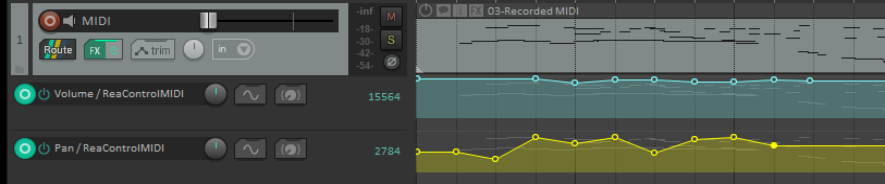
An example of this is shown above, where two automation envelopes have been written to a MIDI track, one for each of two ReaControlMIDI parameters. The first of these produces several volume changes, the second produces changes to the pan setting. These changes are also displayed as events in the ReaControlMIDI window.